mirror of
https://github.com/groue/GRDB.swift
synced 2026-11-28 04:24:20 +00:00

1988 lines
71 KiB
Markdown
1988 lines
71 KiB
Markdown
GRDB Associations
|
|
=================
|
|
|
|
- [Associations Benefits]
|
|
- [The Types of Associations]
|
|
- [BelongsTo]
|
|
- [HasOne]
|
|
- [HasMany]
|
|
- [Choosing Between BelongsTo and HasOne]
|
|
- [Self Joins]
|
|
- [Associations and the Database Schema]
|
|
- [Convention for Database Table Names]
|
|
- [Convention for the BelongsTo Association]
|
|
- [Convention for the HasOne Association]
|
|
- [Convention for the HasMany Association]
|
|
- [Foreign Keys]
|
|
- [Building Requests from Associations]
|
|
- [Requesting Associated Records]
|
|
- [Joining Methods]
|
|
- [Combining Associations]
|
|
- [Filtering Associations]
|
|
- [Sorting Associations]
|
|
- [Columns Selected by an Association]
|
|
- [Table Aliases]
|
|
- [Refining Association Requests]
|
|
- [Fetching Values from Associations]
|
|
- [The Structure of a Joined Request]
|
|
- [Decoding a Joined Request with a Decodable Record]
|
|
- [Decoding a Joined Request with FetchableRecord]
|
|
- [Association Aggregates]
|
|
- [Available Association Aggregates]
|
|
- [Annotating a Request with Aggregates]
|
|
- [Filtering a Request with Aggregates]
|
|
- [Isolation of Multiple Aggregates]
|
|
- [DerivableRequest Protocol]
|
|
- [Known Issues]
|
|
- [Future Directions]
|
|
|
|
|
|
## Associations Benefits
|
|
|
|
**An association is a connection between two [Record] types.**
|
|
|
|
Associations streamline common operations in your code, make them safer, and more efficient. For example, consider a library application that has two record types, author and book:
|
|
|
|
```swift
|
|
struct Author: TableRecord, FetchableRecord {
|
|
var id: Int64
|
|
var name: String
|
|
}
|
|
|
|
struct Book: TableRecord, FetchableRecord {
|
|
var id: Int64
|
|
var authorId: Int64?
|
|
var title: String
|
|
}
|
|
```
|
|
|
|
Now, suppose we wanted to load all books from an existing author. We'd need to do something like this:
|
|
|
|
```swift
|
|
let author: Author = ...
|
|
let books = try Book
|
|
.filter(Column("authorId") == author.id)
|
|
.fetchAll(db)
|
|
```
|
|
|
|
Or, loading all pairs of books along with their authors:
|
|
|
|
```swift
|
|
struct BookInfo {
|
|
var book: Book
|
|
var author: Author?
|
|
}
|
|
|
|
let books = try Book.fetchAll(db)
|
|
let bookInfos = books.map { book -> BookInfo in
|
|
let author = try Author.fetchOne(db, key: book.authorId)
|
|
return BookInfo(book: book, author: author)
|
|
}
|
|
```
|
|
|
|
With GRDB associations, we can streamline these operations (and others), by declaring the connections between books and authors. Here is how we define associations, and properties that access them:
|
|
|
|
```swift
|
|
extension Author {
|
|
static let books = hasMany(Book.self)
|
|
var books: QueryInterfaceRequest<Book> {
|
|
return request(for: Author.books)
|
|
}
|
|
}
|
|
|
|
extension Book {
|
|
static let author = belongsTo(Author.self)
|
|
var author: QueryInterfaceRequest<Author> {
|
|
return request(for: Book.author)
|
|
}
|
|
}
|
|
```
|
|
|
|
Loading all books from an existing author is now easier:
|
|
|
|
```swift
|
|
let books = try author.books.fetchAll(db)
|
|
```
|
|
|
|
As for loading all pairs of books and authors, it is not only easier, but also *far much efficient*:
|
|
|
|
```swift
|
|
struct BookInfo: FetchableRecord, Decodable {
|
|
let book: Book
|
|
let author: Author?
|
|
}
|
|
|
|
let request = Book.including(optional: Book.author)
|
|
let bookInfos = BookInfo.fetchAll(db, request)
|
|
```
|
|
|
|
Before we dive in, please remember that associations can not generate all possible SQL queries that involve several tables. You may also *prefer* writing SQL, and this is just OK, because your SQL skills are welcome: see the [Joined Queries Support](../README.md#joined-queries-support) chapter.
|
|
|
|
|
|
The Types of Associations
|
|
=========================
|
|
|
|
GRDB handles three types of associations:
|
|
|
|
- **BelongsTo**
|
|
- **HasOne**
|
|
- **HasMany**
|
|
|
|
An association declares a link from a record type to another, as in "one book **belongs to** its author". It instructs GRDB to use the foreign keys declared in the database as support for Swift methods.
|
|
|
|
Each one of the three types of associations is appropriate for a particular database situation.
|
|
|
|
- [BelongsTo]
|
|
- [HasOne]
|
|
- [HasMany]
|
|
- [Choosing Between BelongsTo and HasOne]
|
|
- [Self Joins]
|
|
|
|
|
|
## BelongsTo
|
|
|
|
The **BelongsTo** association sets up a one-to-one connection from a record type to another record type, such as each instance of the declaring record "belongs to" an instance of the other record.
|
|
|
|
For example, if your application includes authors and books, and each book is assigned its author, you'd declare the `Book.author` association as below, with its companion property:
|
|
|
|
```swift
|
|
struct Book: TableRecord {
|
|
static let author = belongsTo(Author.self)
|
|
var author: QueryInterfaceRequest<Author> {
|
|
return request(for: Book.author)
|
|
}
|
|
...
|
|
}
|
|
|
|
struct Author: TableRecord {
|
|
...
|
|
}
|
|
```
|
|
|
|
The `Book.author` association will help you build [association requests]. The property lets you fetch a book's author:
|
|
|
|
```swift
|
|
let book: Book = ...
|
|
let author = try book.author.fetchOne(db) // Author?
|
|
```
|
|
|
|
The **BelongsTo** association between a book and its author needs that the database table for books has a column that points to the table for authors:
|
|
|
|
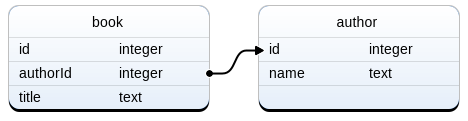
|
|
|
|
See [Convention for the BelongsTo Association] for some sample code that defines the database schema for such an association.
|
|
|
|
|
|
## HasOne
|
|
|
|
The **HasOne** association also sets up a one-to-one connection from a record type to another record type, but with different semantics, and underlying database schema. It is usually used when an entity has been denormalized into two database tables.
|
|
|
|
For example, if your application has one database table for countries, and another for their demographic profiles, you'd declare the `Country.demographics` association as below, with its companion property:
|
|
|
|
```swift
|
|
struct Country: TableRecord {
|
|
static let demographics = hasOne(Demographics.self)
|
|
var demographics: QueryInterfaceRequest<Demographics> {
|
|
return request(for: Country.demographics)
|
|
}
|
|
...
|
|
}
|
|
|
|
struct Demographics: TableRecord {
|
|
...
|
|
}
|
|
```
|
|
|
|
The `Country.demographics` association will help you build [association requests]. The property lets you fetch a country's demographic profile:
|
|
|
|
```swift
|
|
let country: Country = ...
|
|
let demographics = try country.demographics.fetchOne(db) // Demographics?
|
|
```
|
|
|
|
The **HasOne** association between a country and its demographics needs that the database table for demographics has a column that points to the table for countries:
|
|
|
|
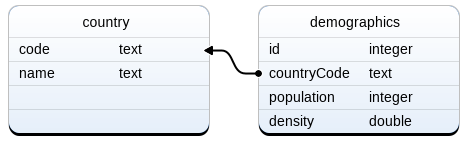
|
|
|
|
See [Convention for the HasOne Association] for some sample code that defines the database schema for such an association.
|
|
|
|
|
|
## HasMany
|
|
|
|
The **HasMany** association indicates a one-to-many connection between two record types, such as each instance of the declaring record "has many" instances of the other record. You'll often find this association on the other side of a **BelongsTo** association.
|
|
|
|
For example, if your application includes authors and books, and each author is assigned zero or more books, you'd declare the `Author.books` association as below, with its companion property:
|
|
|
|
```swift
|
|
struct Author: TableRecord {
|
|
static let books = hasMany(Book.self)
|
|
var books: QueryInterfaceRequest<Book> {
|
|
return request(for: Author.books)
|
|
}
|
|
}
|
|
|
|
struct Book: TableRecord {
|
|
...
|
|
}
|
|
```
|
|
|
|
The `Author.books` association will help you build [association requests]. The property lets you fetch an author's books:
|
|
|
|
```swift
|
|
let author: Author = ...
|
|
let books = try author.books.fetchAll(db) // [Book]
|
|
```
|
|
|
|
The **HasMany** association between an author and its books needs that the database table for books has a column that points to the table for authors:
|
|
|
|
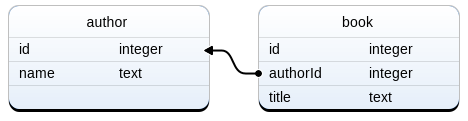
|
|
|
|
See [Convention for the HasMany Association] for some sample code that defines the database schema for such an association.
|
|
|
|
|
|
## Choosing Between BelongsTo and HasOne
|
|
|
|
When you want to set up a one-to-one relationship between two record types, you'll need to add a **BelongsTo** association to one, and a **HasOne** association to the other. How do you know which is which?
|
|
|
|
The distinction is in where you place the database foreign key. The record that points to the other one has the **BelongsTo** association. The other record has the **HasOne** association:
|
|
|
|
A country **has one** demographic profile, a demographic profile **belongs to** a country:
|
|
|
|

|
|
|
|
```swift
|
|
struct Country: TableRecord, FetchableRecord {
|
|
static let demographics = hasOne(Demographics.self)
|
|
...
|
|
}
|
|
|
|
struct Demographics: TableRecord, FetchableRecord {
|
|
static let country = belongsTo(Country.self)
|
|
...
|
|
}
|
|
```
|
|
|
|
## Self Joins
|
|
|
|
When designing your data model, you will sometimes find a record that should have a relation to itself. For example, you may want to store all employees in a single database table, but be able to trace relationships such as between manager and subordinates. This situation can be modeled with self-joining associations:
|
|
|
|
```swift
|
|
struct Employee {
|
|
static let subordinates = hasMany(Employee.self)
|
|
static let manager = belongsTo(Employee.self)
|
|
}
|
|
```
|
|
|
|
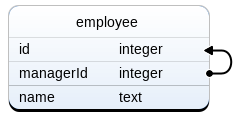
|
|
|
|
The matching [migration] would look like:
|
|
|
|
```swift
|
|
migrator.registerMigration("Employees") { db in
|
|
try db.create(table: "employee") { t in
|
|
t.autoIncrementedPrimaryKey("id")
|
|
t.column("managerId", .integer)
|
|
.indexed()
|
|
.references("employee", onDelete: .restrict)
|
|
t.column("name", .text)
|
|
}
|
|
}
|
|
```
|
|
|
|
|
|
Associations and the Database Schema
|
|
====================================
|
|
|
|
**Associations are grounded in the database schema, the way database tables are defined.**
|
|
|
|
For example, a **[BelongsTo]** association between a book and its author needs that the database table for books has a column that points to the table for authors.
|
|
|
|
GRDB also comes with several *conventions* for defining your database schema.
|
|
|
|
Those conventions help associations be convenient and, generally, "just work". When you can't, or don't want to follow conventions, you will have to override the expected defaults in your Swift code.
|
|
|
|
- [Convention for Database Table Names]
|
|
- [Convention for the BelongsTo Association]
|
|
- [Convention for the HasOne Association]
|
|
- [Convention for the HasMany Association]
|
|
- [Foreign Keys]
|
|
|
|
|
|
## Convention for Database Table Names
|
|
|
|
**Database table names should be singular and camel-cased.**
|
|
|
|
Make them look like Swift identifiers: `book`, `author`, `postalAddress`.
|
|
|
|
This convention helps fetching values from associations. It is used, for example, in the sample code below, where we load all pairs of books along with their authors:
|
|
|
|
```swift
|
|
// The Author record
|
|
struct Author: FetchableRecord, TableRecord {
|
|
}
|
|
|
|
// The Book record
|
|
struct Book: FetchableRecord, TableRecord {
|
|
static let author = belongsTo(Author.self)
|
|
}
|
|
|
|
// A pair made of a book and its author
|
|
struct BookInfo: FetchableRecord, Decodable {
|
|
let book: Book
|
|
let author: Author?
|
|
}
|
|
|
|
let request = Book.including(optional: Book.author)
|
|
let bookInfos = BookInfo.fetchAll(db, request)
|
|
```
|
|
|
|
This sample code only works if the database table for authors is called "author". The name "author" is the key that helps BookInfo initialize its `author` property. For your convenience, "author" is also the default value of the `Author.databaseTableName` property (see the [TableRecord] protocol).
|
|
|
|
If the database schema does not follow this convention, and has, for example, database tables named with plural names (`authors` and `books`), you can still use associations. But you need to help row consumption by providing the required key:
|
|
|
|
```swift
|
|
// Setup for customized table names
|
|
|
|
struct Author: FetchableRecord, TableRecord {
|
|
// Customized table name
|
|
static let databaseTableName = "authors"
|
|
}
|
|
|
|
struct Book: FetchableRecord, TableRecord {
|
|
// Customized table name
|
|
static let databaseTableName = "books"
|
|
|
|
// Explicit association key
|
|
static let author = belongsTo(Author.self, key: "author")
|
|
}
|
|
```
|
|
|
|
See [The Structure of a Joined Request] for more information.
|
|
|
|
|
|
## Convention for the BelongsTo Association
|
|
|
|
**[BelongsTo] associations should be supported by an SQLite foreign key.**
|
|
|
|
Foreign keys are the recommended way to declare relationships between database tables. Not only will SQLite guarantee the integrity of your data, but GRDB will be able to use those foreign keys to automatically configure your associations.
|
|
|
|

|
|
|
|
The matching [migration] could look like:
|
|
|
|
```swift
|
|
migrator.registerMigration("Books and Authors") { db in
|
|
try db.create(table: "author") { t in
|
|
t.autoIncrementedPrimaryKey("id") // (1)
|
|
t.column("name", .text)
|
|
}
|
|
try db.create(table: "book") { t in
|
|
t.autoIncrementedPrimaryKey("id")
|
|
t.column("authorId", .integer) // (2)
|
|
.notNull() // (3)
|
|
.indexed() // (4)
|
|
.references("author", onDelete: .cascade) // (5)
|
|
t.column("title", .text)
|
|
}
|
|
}
|
|
```
|
|
|
|
1. The `author` table has a primary key.
|
|
2. The `book.authorId` column is used to link a book to the author it belongs to.
|
|
3. Make the `book.authorId` column not null if you want SQLite to guarantee that all books have an author.
|
|
4. Create an index on the `book.authorId` column in order to ease the selection of an author's books.
|
|
5. Create a foreign key from `book.authorId` column to `authors.id`, so that SQLite guarantees that no book refers to a missing author. The `onDelete: .cascade` option has SQLite automatically delete all of an author's books when that author is deleted. See [Foreign Key Actions] for more information.
|
|
|
|
The example above uses auto-incremented primary keys. But generally speaking, all primary keys are supported.
|
|
|
|
Following this convention lets you write, for example:
|
|
|
|
```swift
|
|
struct Book: FetchableRecord, TableRecord {
|
|
static let author = belongsTo(Author.self)
|
|
}
|
|
|
|
struct Author: FetchableRecord, TableRecord {
|
|
}
|
|
```
|
|
|
|
If the database schema does not follow this convention, and does not define foreign keys between tables, you can still use **BelongsTo** associations. But your help is needed to define the missing foreign key:
|
|
|
|
```swift
|
|
struct Book: FetchableRecord, TableRecord {
|
|
static let author = belongsTo(Author.self, using: ForeignKey(...))
|
|
}
|
|
```
|
|
|
|
See [Foreign Keys] for more information.
|
|
|
|
|
|
## Convention for the HasOne Association
|
|
|
|
**[HasOne] associations should be supported by an SQLite foreign key.**
|
|
|
|
Foreign keys are the recommended way to declare relationships between database tables. Not only will SQLite guarantee the integrity of your data, but GRDB will be able to use those foreign keys to automatically configure your associations.
|
|
|
|

|
|
|
|
The matching [migration] could look like:
|
|
|
|
```swift
|
|
migrator.registerMigration("Countries") { db in
|
|
try db.create(table: "country") { t in
|
|
t.column("code", .text).primaryKey() // (1)
|
|
t.column("name", .text)
|
|
}
|
|
try db.create(table: "demographics") { t in
|
|
t.autoIncrementedPrimaryKey("id")
|
|
t.column("countryCode", .text) // (2)
|
|
.notNull() // (3)
|
|
.unique() // (4)
|
|
.references("country", onDelete: .cascade) // (5)
|
|
t.column("population", .integer)
|
|
t.column("density", .double)
|
|
}
|
|
}
|
|
```
|
|
|
|
1. The `country` table has a primary key.
|
|
2. The `demographics.countryCode` column is used to link a demographic profile to the country it belongs to.
|
|
3. Make the `demographics.countryCode` column not null if you want SQLite to guarantee that all profiles are linked to a country.
|
|
4. Create a unique index on the `demographics.countryCode` column in order to guarantee the unicity of any country's profile.
|
|
5. Create a foreign key from `demographics.countryCode` column to `country.code`, so that SQLite guarantees that no profile refers to a missing country. The `onDelete: .cascade` option has SQLite automatically delete a profile when its country is deleted. See [Foreign Key Actions] for more information.
|
|
|
|
The example above uses a string primary key for the "country" table. But generally speaking, all primary keys are supported.
|
|
|
|
Following this convention lets you write, for example:
|
|
|
|
```swift
|
|
struct Country: FetchableRecord, TableRecord {
|
|
static let demographics = hasOne(Demographics.self)
|
|
}
|
|
|
|
struct Demographics: FetchableRecord, TableRecord {
|
|
}
|
|
```
|
|
|
|
If the database schema does not follow this convention, and does not define foreign keys between tables, you can still use HasOne associations. But your help is needed to define the missing foreign key:
|
|
|
|
```swift
|
|
struct Country: FetchableRecord, TableRecord {
|
|
static let demographics = hasOne(Demographics.self, using: ForeignKey(...))
|
|
}
|
|
```
|
|
|
|
See [Foreign Keys] for more information.
|
|
|
|
|
|
## Convention for the HasMany Association
|
|
|
|
**[HasMany] associations should be supported by an SQLite foreign key.**
|
|
|
|
Foreign keys are the recommended way to declare relationships between database tables. Not only will SQLite guarantee the integrity of your data, but GRDB will be able to use those foreign keys to automatically configure your associations.
|
|
|
|

|
|
|
|
The matching [migration] could look like:
|
|
|
|
```swift
|
|
migrator.registerMigration("Books and Authors") { db in
|
|
try db.create(table: "author") { t in
|
|
t.autoIncrementedPrimaryKey("id") // (1)
|
|
t.column("name", .text)
|
|
}
|
|
try db.create(table: "book") { t in
|
|
t.autoIncrementedPrimaryKey("id")
|
|
t.column("authorId", .integer) // (2)
|
|
.notNull() // (3)
|
|
.indexed() // (4)
|
|
.references("author", onDelete: .cascade) // (5)
|
|
t.column("title", .text)
|
|
}
|
|
}
|
|
```
|
|
|
|
1. The `author` table has a primary key.
|
|
2. The `book.authorId` column is used to link a book to the author it belongs to.
|
|
3. Make the `book.authorId` column not null if you want SQLite to guarantee that all books have an author.
|
|
4. Create an index on the `book.authorId` column in order to ease the selection of an author's books.
|
|
5. Create a foreign key from `book.authorId` column to `authors.id`, so that SQLite guarantees that no book refers to a missing author. The `onDelete: .cascade` option has SQLite automatically delete all of an author's books when that author is deleted. See [Foreign Key Actions] for more information.
|
|
|
|
The example above uses auto-incremented primary keys. But generally speaking, all primary keys are supported.
|
|
|
|
Following this convention lets you write, for example:
|
|
|
|
```swift
|
|
struct Book: FetchableRecord, TableRecord {
|
|
}
|
|
|
|
struct Author: FetchableRecord, TableRecord {
|
|
static let books = hasMany(Book.self)
|
|
}
|
|
```
|
|
|
|
If the database schema does not follow this convention, and does not define foreign keys between tables, you can still use **HasMany** associations. But your help is needed to define the missing foreign key:
|
|
|
|
```swift
|
|
struct Author: FetchableRecord, TableRecord {
|
|
static let books = hasMany(Book.self, using: ForeignKey(...))
|
|
}
|
|
```
|
|
|
|
See [Foreign Keys] for more information.
|
|
|
|
|
|
## Foreign Keys
|
|
|
|
**Associations can automatically infer the foreign keys that define how two database tables are linked together.**
|
|
|
|
In the example below, the `book.authorId` column is automatically used to link a book to its author:
|
|
|
|

|
|
|
|
```swift
|
|
struct Book: TableRecord {
|
|
static let author = belongsTo(Author.self)
|
|
}
|
|
|
|
struct Author: TableRecord {
|
|
static let books = hasMany(Book.self)
|
|
}
|
|
```
|
|
|
|
But this requires the database schema to define a foreign key between the book and author database tables (see [Convention for the BelongsTo Association]).
|
|
|
|
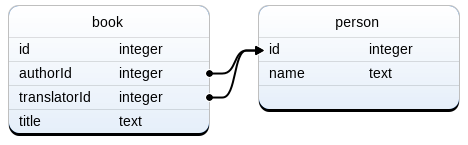
Sometimes the database schema does not define any foreign key. And sometimes, there are *several* foreign keys from a table to another.
|
|
|
|
|
|
|
|
When this happens, associations can't be automatically inferred from the database schema. GRDB will complain with a fatal error such as "Ambiguous foreign key from book to person", or "Could not infer foreign key from book to person".
|
|
|
|
Your help is needed. You have to instruct GRDB which foreign key to use:
|
|
|
|
```swift
|
|
struct Book: TableRecord {
|
|
// Define foreign keys
|
|
static let authorForeignKey = ForeignKey(["authorId"]))
|
|
static let translatorForeignKey = ForeignKey(["translatorId"]))
|
|
|
|
// Use foreign keys to define associations:
|
|
static let author = belongsTo(Person.self, using: authorForeignKey)
|
|
static let translator = belongsTo(Person.self, using: translatorForeignKey)
|
|
}
|
|
```
|
|
|
|
Foreign keys are always defined from the table that contains the columns at the origin of the foreign key. Person's symmetric **HasMany** associations reuse Book's foreign keys:
|
|
|
|
```swift
|
|
struct Person: TableRecord {
|
|
static let writtenBooks = hasMany(Book.self, using: Book.authorForeignKey)
|
|
static let translatedBooks = hasMany(Book.self, using: Book.translatorForeignKey)
|
|
}
|
|
```
|
|
|
|
Foreign keys can also be defined from query interface columns:
|
|
|
|
```swift
|
|
struct Book: TableRecord {
|
|
enum Columns: String, ColumnExpression {
|
|
case id, title, authorId, translatorId
|
|
}
|
|
|
|
static let authorForeignKey = ForeignKey([Columns.authorId]))
|
|
static let translatorForeignKey = ForeignKey([Columns.translatorId]))
|
|
}
|
|
```
|
|
|
|
When the destination table of a foreign key does not define any primary key, you need to provide the full definition of a foreign key:
|
|
|
|
```swift
|
|
struct Book: TableRecord {
|
|
static let authorForeignKey = ForeignKey(["authorId"], to: ["id"]))
|
|
static let author = belongsTo(Person.self, using: authorForeignKey)
|
|
}
|
|
```
|
|
|
|
|
|
Building Requests from Associations
|
|
===================================
|
|
|
|
**Once you have defined associations, you can define fetch request that involve several record types.**
|
|
|
|
> :point_up: **Note**: Those requests are executed by SQLite as *SQL joined queries*. In all examples below, we'll show the SQL queries executed by our association-based requests. You can ignore them if you are not familiar with SQL.
|
|
|
|
Fetch requests do not visit the database until you fetch values from them. This will be covered in [Fetching Values from Associations]. But before you can fetch anything, you have to describe what you want to fetch. This is the topic of this chapter.
|
|
|
|
- [Requesting Associated Records]
|
|
- [Joining Methods]
|
|
- [Combining Associations]
|
|
- [Filtering Associations]
|
|
- [Sorting Associations]
|
|
- [Columns Selected by an Association]
|
|
- [Table Aliases]
|
|
- [Refining Association Requests]
|
|
|
|
|
|
## Requesting Associated Records
|
|
|
|
**You can use associations to build requests for associated records.**
|
|
|
|
For example, given a `Book.author` **[BelongsTo]** association, you can build a request for the author of a book. In the example below, we return this request from the `Book.author` property:
|
|
|
|
```swift
|
|
struct Book: PersistableRecord {
|
|
static let author = belongsTo(Author.self)
|
|
|
|
/// The request for a book's author
|
|
var author: QueryInterfaceRequest<Author> {
|
|
return request(for: Book.author)
|
|
}
|
|
}
|
|
```
|
|
|
|
This request can fetch a book's author:
|
|
|
|
```swift
|
|
let book: Book = ...
|
|
let author = try book.author.fetchOne(db) // Author?
|
|
```
|
|
|
|
**[HasOne]** and **[HasMany]** associations can also build requests for associated records. For example:
|
|
|
|
```swift
|
|
struct Author: PersistableRecord {
|
|
static let books = hasMany(Book.self)
|
|
|
|
/// The request for an author's books
|
|
var books: QueryInterfaceRequest<Book> {
|
|
return request(for: Author.books)
|
|
}
|
|
}
|
|
|
|
let author: Author = ...
|
|
let books = try author.books.fetchAll(db) // [Book]
|
|
```
|
|
|
|
Requests for associated records can be filtered and ordered like all [query interface requests]:
|
|
|
|
```swift
|
|
let novels = try author
|
|
.books
|
|
.filter(Column("kind") == BookKind.novel)
|
|
.order(Column("publishDate").desc)
|
|
.fetchAll(db)
|
|
```
|
|
|
|
Those requests can also turn out useful when you want to track their changes with database observation tools like [RxGRDB](http://github.com/RxSwiftCommunity/RxGRDB):
|
|
|
|
```swift
|
|
// Track changes in the author's books:
|
|
let author: Author = ...
|
|
author.books.rx
|
|
.fetchAll(in: dbQueue)
|
|
.subscribe(onNext: { (books: [Book]) in
|
|
print("Author's book have changed")
|
|
})
|
|
```
|
|
|
|
|
|
## Joining Methods
|
|
|
|
**You build requests that involve several records with the four "joining methods":**
|
|
|
|
- `including(optional: association)`
|
|
- `including(required: association)`
|
|
- `joining(optional: association)`
|
|
- `joining(required: association)`
|
|
|
|
Before we describe them in detail, let's see a few requests they can build:
|
|
|
|
```swift
|
|
/// All books with their respective authors
|
|
let request = Book
|
|
.including(required: Book.author)
|
|
|
|
/// All books with their respective authors, sorted by title
|
|
let request = Book
|
|
.order(Column("title"))
|
|
.including(required: Book.author)
|
|
|
|
/// All books written by a French author
|
|
let request = Book
|
|
.joining(required: Book.author.filter(Column("countryCode") == "FR"))
|
|
```
|
|
|
|
The pattern is always the same: you start from a base request, that you extend with one of the joining methods.
|
|
|
|
**To choose the joining method you need, you ask yourself two questions:**
|
|
|
|
1. Should the associated records be fetched along with the base records?
|
|
|
|
If yes, use `including(...)`. Otherwise, use `joining(...)`.
|
|
|
|
For example, to load all books with their respective authors, you want authors to be fetched, and you use `including`:
|
|
|
|
```swift
|
|
/// All books with their respective authors
|
|
let request = Book
|
|
.including(required: Book.author)
|
|
```
|
|
|
|
On the other side, to load all books written by a French author, you sure need to filter authors, but you don't need them to be present in the fetched results. You prefer `joining`:
|
|
|
|
```swift
|
|
/// All books written by a French author
|
|
let request = Book
|
|
.joining(required: Book.author.filter(Column("countryCode") == "FR"))
|
|
```
|
|
|
|
2. Should the request allow missing associated records?
|
|
|
|
If yes, choose the `optional` variant. Otherwise, choose `required`.
|
|
|
|
For example, to load all books with their respective authors, even if the book has no recorded author, you'd use `including(optional:)`:
|
|
|
|
```swift
|
|
/// All books with their respective (eventual) authors
|
|
/// (One Thousand and One Nights should be there)
|
|
let request = Book
|
|
.including(optional: Book.author)
|
|
```
|
|
|
|
You can remember to use `optional` when the fetched associated records should feed optional Swift values, of type `Author?`. Conversely, when the fetched results feed non-optional values of type `Author`, prefer `required`.
|
|
|
|
Another way to describe the difference is that `required` filters the fetched results in order to discard missing associated records, when `optional` does not filter anything, and lets missing values pass through.
|
|
|
|
For example, consider this request:
|
|
|
|
```swift
|
|
let request = Book
|
|
.joining(optional: Book.author.filter(Column("countryCode") == "FR"))
|
|
```
|
|
|
|
It fetches books that have a French author, but also those who don't :sweat_smile:. It's just another way to tell `Book.all()`. But we'll see below that such join can turn out useful.
|
|
|
|
Finally, readers who speak SQL may compare `optional` with left joins, and `required` with inner joins.
|
|
|
|
|
|
## Combining Associations
|
|
|
|
**Associations can be combined in order to build more complex requests.**
|
|
|
|
You can join several associations in parallel:
|
|
|
|
```swift
|
|
// SELECT book.*, person1.*, person2.*
|
|
// FROM book
|
|
// JOIN person person1 ON person1.id = book.authorId
|
|
// LEFT JOIN person person2 ON person2.id = book.translatorId
|
|
let request = Book
|
|
.including(required: Book.author)
|
|
.including(optional: Book.translator)
|
|
```
|
|
|
|
The request above fetches all books, along with their author and eventual translator.
|
|
|
|
You can chain associations in order to jump from a record to another:
|
|
|
|
```swift
|
|
// SELECT book.*, person.*, country.*
|
|
// FROM book
|
|
// JOIN person ON person.id = book.authorId
|
|
// LEFT JOIN country ON country.code = person.countryCode
|
|
let request = Book
|
|
.including(required: Book.author
|
|
.including(optional: Person.country))
|
|
```
|
|
|
|
The request above fetches all books, along with their author, and their author's country.
|
|
|
|
When you chain associations, you can avoid fetching intermediate values by replacing the `including` method with `joining`:
|
|
|
|
```swift
|
|
// SELECT book.*, country.*
|
|
// FROM book
|
|
// LEFT JOIN person ON person.id = book.authorId
|
|
// LEFT JOIN country ON country.code = person.countryCode
|
|
let request = Book
|
|
.joining(optional: Book.author
|
|
.including(optional: Person.country))
|
|
```
|
|
|
|
The request above fetches all books, along with their author's country.
|
|
|
|
> :warning: **Warning**: you can not currently chain a required association behind an optional association:
|
|
>
|
|
> ```swift
|
|
> // Not implemented
|
|
> let request = Book
|
|
> .joining(optional: Book.author
|
|
> .including(required: Person.country))
|
|
> ```
|
|
>
|
|
> This code compiles, but you'll get a runtime fatal error "Not implemented: chaining a required association behind an optional association". Future versions of GRDB may allow such requests.
|
|
|
|
|
|
## Filtering Associations
|
|
|
|
**You can filter associated records.**
|
|
|
|
The `filter(_:)`, `filter(key:)` and `filter(keys:)` methods, that you already know for [filtering simple requests](../README.md#requests), can filter associated records as well:
|
|
|
|
```swift
|
|
// SELECT book.*
|
|
// FROM book
|
|
// JOIN person ON person.id = book.authorId
|
|
// AND person.countryCode = 'FR'
|
|
let frenchAuthor = Book.author.filter(Column("countryCode") == "FR")
|
|
let request = Book.joining(required: frenchAuthor)
|
|
```
|
|
|
|
The request above fetches all books written by a French author.
|
|
|
|
**There are more filtering options:**
|
|
|
|
- Filtering on conditions that involve several tables.
|
|
- Filtering in the WHERE clause instead of the ON clause (can be useful when you are skilled enough in SQL to make the difference).
|
|
|
|
Those extra filtering options require **[Table Aliases]**, introduced below.
|
|
|
|
|
|
## Sorting Associations
|
|
|
|
**You can sort fetched results according to associated records.**
|
|
|
|
The `order()` method, that you already know for [sorting simple requests](../README.md#requests), can sort associated records as well:
|
|
|
|
```swift
|
|
// SELECT book.*, person.*
|
|
// FROM book
|
|
// JOIN person ON person.id = book.authorId
|
|
// ORDER BY person.name
|
|
let sortedAuthor = Book.author.order(Column("name"))
|
|
let request = Book.including(required: sortedAuthor)
|
|
```
|
|
|
|
When you sort both the base record on the associated record, the request is sorted on the base record first, and on the associated record next:
|
|
|
|
```swift
|
|
// SELECT book.*, person.*
|
|
// FROM book
|
|
// JOIN person ON person.id = book.authorId
|
|
// ORDER BY book.publishDate DESC, person.name
|
|
let sortedAuthor = Book.author.order(Column("name"))
|
|
let request = Book
|
|
.including(required: sortedAuthor)
|
|
.order(Column("publishDate").desc)
|
|
```
|
|
|
|
**There are more sorting options:**
|
|
|
|
- Sorting on expressions that involve several tables.
|
|
- Changing the order of the sorting terms (such as sorting on author name first, and then publish date).
|
|
|
|
Those extra sorting options require **[Table Aliases]**, introduced below.
|
|
|
|
|
|
## Columns Selected by an Association
|
|
|
|
By default, associated records include all their columns:
|
|
|
|
```swift
|
|
// SELECT book.*, author.*
|
|
// FROM book
|
|
// JOIN author ON author.id = book.authorId
|
|
let request = Book.including(required: Book.author)
|
|
```
|
|
|
|
**The selection can be changed for each individual request, or for all requests including a given type.**
|
|
|
|
To specify the selection of an associated record in a specific request, use the `select` method:
|
|
|
|
```swift
|
|
// SELECT book.*, author.id, author.name
|
|
// FROM book
|
|
// JOIN author ON author.id = book.authorId
|
|
let restrictedAuthor = Book.author.select(Column("id"), Column("name"))
|
|
let request = Book.including(required: restrictedAuthor)
|
|
```
|
|
|
|
To specify the default selection for all inclusions of a given type, define the `databaseSelection` property:
|
|
|
|
```swift
|
|
struct RestrictedAuthor: TableRecord {
|
|
static let databaseSelection: [SQLSelectable] = [Column("id"), Column("name")]
|
|
}
|
|
|
|
struct ExtendedAuthor: TableRecord {
|
|
static let databaseSelection: [SQLSelectable] = [AllColumns(), Column.rowID]
|
|
}
|
|
|
|
extension Book {
|
|
static let restrictedAuthor = belongsTo(RestrictedAuthor.self)
|
|
static let extendedAuthor = belongsTo(ExtendedAuthor.self)
|
|
}
|
|
|
|
// SELECT book.*, author.id, author.name
|
|
// FROM book
|
|
// JOIN author ON author.id = book.authorId
|
|
let request = Book.including(required: Book.restrictedAuthor)
|
|
|
|
// SELECT book.*, author.*, author.rowid
|
|
// FROM book
|
|
// JOIN author ON author.id = book.authorId
|
|
let request = Book.including(required: Book.extendedAuthor)
|
|
```
|
|
|
|
Modifying `databaseSelection` not only affects joined requests, but all requests built from the modified record. This is how records make sure they are always fed with the columns they need, no more, no less:
|
|
|
|
```swift
|
|
// SELECT id, name FROM author
|
|
let request = RestrictedAuthor.all()
|
|
```
|
|
|
|
> :point_up: **Note**: make sure the `databaseSelection` property is explicitely declared as `[SQLSelectable]`. If it is not, the Swift compiler may infer a type which may silently miss the protocol requirement, resulting in sticky SELECT * requests. See [Columns Selected by a Request](../README.md#columns-selected-by-a-request) for further information.
|
|
|
|
|
|
## Table Aliases
|
|
|
|
In all examples we have seen so far, all associated records are joined, included, filtered, and sorted independently. We could not filter them on conditions that involve several records, for example.
|
|
|
|
Let's say we look for posthumous books, published after their author has died. We need to compare a book publication date with an author eventual death date.
|
|
|
|
Let's first see a wrong way to do it:
|
|
|
|
```swift
|
|
// A wrong request:
|
|
// SELECT book.*
|
|
// FROM book
|
|
// JOIN person ON person.id = book.authorId
|
|
// WHERE book.publishDate >= book.deathDate
|
|
let request = Book
|
|
.joining(required: Book.author)
|
|
.filter(Column("publishDate") >= Column("deathDate"))
|
|
```
|
|
|
|
When executed, we'll get a DatabaseError of code 1, "no such column: book.deathDate".
|
|
|
|
That is because the "deathDate" column has been used for filtering books, when it is defined on the person database table.
|
|
|
|
To fix this error, we need a **table alias**:
|
|
|
|
```swift
|
|
let authorAlias = TableAlias()
|
|
```
|
|
|
|
We modify the `Book.author` association so that it uses this table alias, and we use the table alias to qualify author columns where needed:
|
|
|
|
```swift
|
|
// SELECT book.*
|
|
// FROM book
|
|
// JOIN person ON person.id = book.authorId
|
|
// WHERE book.publishDate >= person.deathDate
|
|
let request = Book
|
|
.joining(required: Book.author.aliased(authorAlias))
|
|
.filter(Column("publishDate") >= authorAlias[Column("deathDate")])
|
|
```
|
|
|
|
**Table aliases** can also improve control over the ordering of request results. In the example below, we override the [default ordering](#sorting-associations) of associated records by sorting on author names first:
|
|
|
|
```swift
|
|
// SELECT book.*
|
|
// FROM book
|
|
// JOIN person ON person.id = book.authorId
|
|
// ORDER BY person.name, book.publishDate
|
|
let request = Book
|
|
.joining(required: Book.author.aliased(authorAlias))
|
|
.order(authorAlias[Column("name")], Column("publishDate"))
|
|
```
|
|
|
|
**Table aliases** can be given a name. This name is guaranteed to be used as the table alias in the SQL query. This guarantee lets you write SQL snippets when you need it:
|
|
|
|
```swift
|
|
// SELECT b.*
|
|
// FROM book b
|
|
// JOIN person a ON a.id = b.authorId
|
|
// AND a.countryCode = 'FR'
|
|
// WHERE b.publishDate >= a.deathDate
|
|
let bookAlias = TableAlias(name: "b")
|
|
let authorAlias = TableAlias(name: "a")
|
|
let request = Book.aliased(bookAlias)
|
|
.joining(required: Book.author.aliased(authorAlias)
|
|
.filter(sql: "a.countryCode = ?", arguments: ["FR"]))
|
|
.filter(sql: "b.publishDate >= a.deathDate")
|
|
```
|
|
|
|
> :point_up: **Note**: avoid reusing table aliases between several tables or requests, because you will get a fatal error:
|
|
>
|
|
> ```swift
|
|
> // Fatal error: A TableAlias most not be used to refer to multiple tables
|
|
> let alias = TableAlias()
|
|
> let books = Book.aliased(alias)...
|
|
> let people = Person.aliased(alias)...
|
|
> ```
|
|
|
|
|
|
## Refining Association Requests
|
|
|
|
You can join and include an association several times in a single request. This can help you craft complex requests in a modular way.
|
|
|
|
Let's say, for example, that your application needs all books, along with their Spanish authors, sorted by author name and then by title. That's already pretty complex.
|
|
|
|
This request can be built in a single shot:
|
|
|
|
```swift
|
|
let authorAlias = TableAlias()
|
|
let request = Book
|
|
.including(required: Book.author
|
|
.filter(Column("countryCode") == "ES")
|
|
.aliased(authorAlias))
|
|
.order(authorAlias[Column("name")], Column("title"))
|
|
```
|
|
|
|
The same request can also be built in three distinct steps, as below:
|
|
|
|
```swift
|
|
// 1. include author
|
|
var request = Book.including(required: Book.author)
|
|
|
|
// 2. filter by author country
|
|
request = request.joining(required: Book.author.filter(Column("countryCode") == "ES"))
|
|
|
|
// 3. sort by author name and then title
|
|
let authorAlias = TableAlias()
|
|
request = request
|
|
.joining(optional: Book.author.aliased(authorAlias))
|
|
.order(authorAlias[Column("name")], Column("title"))
|
|
```
|
|
|
|
See how the `Book.author` has been joined or included, on each step, independently, for a different purpose. We can wrap those steps in an extension to the `QueryInterfaceRequest<Book>` type:
|
|
|
|
```swift
|
|
extension QueryInterfaceRequest where T == Book {
|
|
func filter(authorCountryCode: String) -> QueryInterfaceRequest<Book> {
|
|
let filteredAuthor = Book.author.filter(Column("countryCode") == countryCode)
|
|
return joining(required: filteredAuthor)
|
|
}
|
|
|
|
func orderedByAuthorNameAndTitle() -> QueryInterfaceRequest<Book> {
|
|
let authorAlias = TableAlias()
|
|
return joining(optional: Book.author.aliased(authorAlias))
|
|
.order(authorAlias[Column("name")], Column("title"))
|
|
}
|
|
}
|
|
```
|
|
|
|
And now our complex request looks much simpler:
|
|
|
|
```swift
|
|
let request = Book
|
|
.including(required: Book.author)
|
|
.filter(authorCountryCode: "ES")
|
|
.orderedByAuthorNameAndTitle()
|
|
```
|
|
|
|
When you join or include an association several times, with the same **[association key](#the-structure-of-a-joined-request)**, GRDB will apply the following rules:
|
|
|
|
- `including` wins over `joining`:
|
|
|
|
```swift
|
|
// Equivalent to Record.including(optional: association)
|
|
Record
|
|
.including(optional: association)
|
|
.joining(optional: association)
|
|
```
|
|
|
|
- `required` wins over `optional`:
|
|
|
|
```swift
|
|
// Equivalent to Record.including(required: association)
|
|
Record
|
|
.including(required: association)
|
|
.including(optional: association)
|
|
```
|
|
|
|
- All [filters](#filtering-associations) are applied:
|
|
|
|
```swift
|
|
// Equivalent to Record.including(required: association.filter(condition1 && condition2))
|
|
Record
|
|
.including(required: association.filter(condition1))
|
|
.including(optional: association.filter(condition1))
|
|
```
|
|
|
|
- The last [ordering](#sorting-associations) wins:
|
|
|
|
```swift
|
|
// Equivalent to Record.including(required: association.order(ordering2))
|
|
Record
|
|
.including(required: association.order(ordering1))
|
|
.including(optional: association.order(ordering2))
|
|
```
|
|
|
|
- The last [selection](#columns-selected-by-an-association) wins:
|
|
|
|
```swift
|
|
// Equivalent to Record.including(required: association.select(selection2))
|
|
Record
|
|
.including(required: association.select(selection1))
|
|
.including(optional: association.select(selection2))
|
|
```
|
|
|
|
|
|
Fetching Values from Associations
|
|
=================================
|
|
|
|
We have seen in [Building Requests from Associations] how to define requests that involve several records by the mean of [Joining Methods].
|
|
|
|
If your application needs to display a list of books with information about their author, country, and cover image, you may build the following joined request:
|
|
|
|
```swift
|
|
// SELECT book.*, author.*, country.*, coverImage.*
|
|
// FROM book
|
|
// JOIN author ON author.id = book.authorId
|
|
// LEFT JOIN country ON country.code = author.countryCode
|
|
// LEFT JOIN coverImage ON coverImage.bookId = book.id
|
|
let request = Book
|
|
.including(required: Book.author
|
|
.including(optional: Author.country))
|
|
.including(optional: Bool.coverImage)
|
|
```
|
|
|
|
**Now is the time to tell how joined requests should be consumed.**
|
|
|
|
You will generally define a record type that matches the structure of the request. You'll make it adopt the [FetchableRecord] protocol, so that it can decode database rows. Often, you'll also make it adopt the standard Decodable protocol, because the compiler will generate the decoding code for you.
|
|
|
|
For example, the request above can be consumed into the following record:
|
|
|
|
```swift
|
|
struct BookInfo: FetchableRecord, Decodable {
|
|
var book: Book
|
|
var author: Author
|
|
var country: Country?
|
|
var coverImage: CoverImage?
|
|
}
|
|
|
|
let bookInfos = try BookInfo.fetchAll(db, request) // [BookInfo]
|
|
```
|
|
|
|
- [The Structure of a Joined Request]
|
|
- [Decoding a Joined Request with a Decodable Record]
|
|
- [Decoding a Joined Request with FetchableRecord]
|
|
- [Good Practices for Designing Record Types] - in this general guide about records, check out the "Compose Records" chapter.
|
|
|
|
|
|
## The Structure of a Joined Request
|
|
|
|
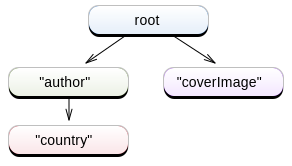
**Joined request defines a tree of associated records identified by "association keys".**
|
|
|
|
Below, author and cover image are both associated to book, and country is associated to author:
|
|
|
|
```swift
|
|
let request = Book
|
|
.including(required: Book.author
|
|
.including(optional: Author.country))
|
|
.including(optional: Bool.coverImage)
|
|
```
|
|
|
|
This request builds the following **tree of association keys**:
|
|
|
|
|
|
|
|
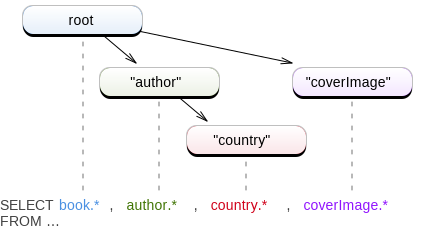
**Association keys** are strings. They are the names of the database tables of associated records (unless you specify otherwise, as we'll see below).
|
|
|
|
Those keys are associated with slices in the fetched rows:
|
|
|
|
|
|
|
|
We'll see below how this tree of association keys and row slices can feed a Decodable record type. We'll then add some details by using FetchableRecord without Decodable support.
|
|
|
|
|
|
## Decoding a Joined Request with a Decodable Record
|
|
|
|
When **association keys** match the property names of a Decodable record, you get free decoding of joined requests into this record:
|
|
|
|
```swift
|
|
struct BookInfo: FetchableRecord, Decodable {
|
|
var book: Book
|
|
var author: Author
|
|
var country: Country?
|
|
var coverImage: CoverImage?
|
|
}
|
|
|
|
let bookInfos = try BookInfo.fetchAll(db, request) // [BookInfo]
|
|
```
|
|
|
|
We see that a hierarchical tree has been flattened in the `BookInfo` record.
|
|
|
|
This flattening is made possible because the BookInfo initializer generated by the Decodable protocol matches **coding keys** with **association keys** by performing a breadth-first search in the tree of association keys.
|
|
|
|
This deserves a little explanation:
|
|
|
|
You known that the Decodable protocol feeds a value's properties by looking for **coding keys**. For example, the standard built-in JSONDecoder matches those coding keys with dictionary keys in a JSON object. The GRDB record decoder also matches coding keys, but with association keys:
|
|
|
|

|
|
|
|
Practically speaking, the BookInfo initializer first looks for the "book" coding key. This key is not found anywhere in the tree of association keys, so the book property is initialized from the row slice associated with the root of the tree, which contains book columns.
|
|
|
|
The BookInfo initializer then looks for the "author", "country", and "coverImage" coding keys. All those are found in the tree of association keys, and each property is initialized from its matching row slice.
|
|
|
|
The key lookup digs into the tree of association keys, and stops as soon as a key as been found, digging into deep tree levels only if the key was not found in higher levels (that's called a "breadth-first search"). This is how we can decode a hierarchical tree into a flat record.
|
|
|
|
But sometimes your decoded records will have better reflect the hierarchical structure of the request:
|
|
|
|
|
|
### Decoding a Hierarchical Decodable Record
|
|
|
|
Some requests are better decoded with a Decodable record that reflects the hierarchical structure of the request.
|
|
|
|
```swift
|
|
let request = Book
|
|
.including(optional: Bool.coverImage)
|
|
.including(required: Book.author
|
|
.including(optional: Person.country))
|
|
.including(optional: Book.translator
|
|
.including(optional: Person.country))
|
|
```
|
|
|
|
This requests for all books, with their cover images, and their authors and translators. Those people are themselves decorated with their respective nationalities.
|
|
|
|
We plan to decode this request into is the following record:
|
|
|
|
```swift
|
|
struct BookInfo: FetchableRecord, Decodable {
|
|
struct AuthorInfo: Decodable {
|
|
var author: Author
|
|
var country: Country?
|
|
}
|
|
var book: Book
|
|
var authorInfo: AuthorInfo
|
|
var translatorInfo: AuthorInfo?
|
|
var coverImage: CoverImage?
|
|
}
|
|
```
|
|
|
|
This request needs a little preparation: we need **association keys** that match the **coding keys** for the authorInfo and translatorInfo properties.
|
|
|
|
And who is the most able to know those coding keys? BookInfo itself, thanks to its `CodingKeys` enum that was automatically generated by the Swift compiler. We thus define the `BookInfo.all()` method that builds our request:
|
|
|
|
```swift
|
|
extension BookInfo {
|
|
static func all() -> QueryInterfaceRequest<BookInfo> {
|
|
return Book
|
|
.including(optional: Bool.coverImage)
|
|
.including(required: Book.author
|
|
.forKey(CodingKeys.authorInfo) // (1)
|
|
.including(optional: Person.country))
|
|
.including(optional: Book.translator
|
|
.forKey(CodingKeys.translatorInfo) // (1)
|
|
.including(optional: Person.country))
|
|
.asRequest(of: BookInfo.self) // (2)
|
|
}
|
|
}
|
|
|
|
let bookInfos = try BookInfo.all().fetchAll(db, request) // [BookInfo]
|
|
```
|
|
|
|
1. The `forKey(_:)` method changes the association key, so that the associated records can feed their target properties.
|
|
2. The `asRequest(of:)` method turns the request into a request of BookInfo. See [Custom Requests] for more information.
|
|
|
|
|
|
### Debugging Joined Request Decoding
|
|
|
|
When you have difficulties building a Decodable record that successfully decodes a joined request, we advise to temporarily decode raw database rows, and inspect them.
|
|
|
|
```swift
|
|
let request = Book
|
|
.including(required: Book.author
|
|
.including(optional: Author.country))
|
|
.including(optional: Bool.coverImage)
|
|
|
|
let rows = try Row.fetchAll(db, request)
|
|
print(rows[0])
|
|
// Prints:
|
|
// ▿ [id:1, authorId:2, title:"Moby-Dick"]
|
|
// unadapted: [id:1, authorId:2, title:"Moby-Dick", id:2, name:"Herman Melville", countryCode:"US", code:"US", name:"United States of America", id:NULL, imageId:NULL, path:NULL]
|
|
// - person: [id:2, name:"Herman Melville", countryCode:"US"]
|
|
// - country: [code:"US", name:"United States of America"]
|
|
// - coverImage: [id:NULL, imageId:NULL, path:NULL]
|
|
```
|
|
|
|
There are two important things to look into the row debugging description:
|
|
|
|
- the **association keys**: "person", "country", and "coverImage" in our example
|
|
- associated rows that contain only null values (coverImage).
|
|
|
|
The associated rows that contain only null values are easy to deal with: null rows loaded from optional associated records should be decoded into Swift optionals:
|
|
|
|
```swift
|
|
struct BookInfo: FetchableRecord, Decodable {
|
|
var book: Book
|
|
var author: Author // .including(required: Book.author)
|
|
var country: Country? // .including(optional: Author.country)
|
|
var coverImage: CoverImage? // .including(optional: Bool.coverImage)
|
|
}
|
|
```
|
|
|
|
**Association keys** may not match the property names of your Decodable record. In this case, use the `forKey(_:)` method.
|
|
|
|
This can be done at the request level:
|
|
|
|
```swift
|
|
struct BookInfo: FetchableRecord, Decodable {
|
|
var book: Book
|
|
var author: Author // Expect "author" association key
|
|
var country: Country?
|
|
var coverImage: CoverImage?
|
|
}
|
|
|
|
let request = Book
|
|
.including(required: Book.author
|
|
.forKey("author") // Change association key
|
|
.including(optional: Author.country))
|
|
.including(optional: Bool.coverImage)
|
|
```
|
|
|
|
Association keys can also be defined right into the definition of the association:
|
|
|
|
```swift
|
|
struct Book {
|
|
static let author = belongsTo(Person.self, key: "author")
|
|
}
|
|
|
|
let request = Book
|
|
.including(required: Book.author // "author" association key
|
|
.including(optional: Author.country))
|
|
.including(optional: Bool.coverImage)
|
|
```
|
|
|
|
The best choice is up to you and the structure of your application. See also [Decoding a Hierarchical Decodable Record] for further discussion about decoding keys.
|
|
|
|
|
|
## Decoding a Joined Request with FetchableRecord
|
|
|
|
When [Dedocable](#decoding-a-joined-request-with-a-decodable-record) records provides convenient decoding of joined rows, you may want a little more control over row decoding.
|
|
|
|
The `init(row:)` initializer of the FetchableRecord protocol is what you look after:
|
|
|
|
```swift
|
|
struct BookInfo: FetchableRecord {
|
|
var book: Book
|
|
var author: Author
|
|
var country: Country?
|
|
var coverImage: CoverImage?
|
|
|
|
init(row: Row) {
|
|
book = Book(row: row)
|
|
author = row["author"]
|
|
country = row["country"]
|
|
coverImage = row["coverImage"]
|
|
}
|
|
}
|
|
|
|
let bookInfos = try BookInfo.fetchAll(db, request) // [BookInfo]
|
|
```
|
|
|
|
You are already familiar with row subscripts to decode [database values](../README.md#column-values):
|
|
|
|
```swift
|
|
let name: String = row["name"]
|
|
```
|
|
|
|
When you extract a record instead of a value from a row, GRDB perfoms a breadth-first search in the tree of **association keys** defined by the joined request. If the key is not found, or only associated with columns that all contain NULL values, an optional record is decoded as nil:
|
|
|
|
```swift
|
|
let author: Author = row["author"]
|
|
let country: Country? = row["country"]
|
|
```
|
|
|
|
You can also perform custom navigation in the tree by using *row scopes*. See [Row Adapters] for more information.
|
|
|
|
|
|
## Association Aggregates
|
|
|
|
It is possible to fetch aggregated values from a **[HasMany]** association:
|
|
|
|
Counting associated records, fetching the minimum, maximum, average value of an associated record column, computing the sum of an associated record column, these are all aggregation operations.
|
|
|
|
When you need to compute aggregates **from a single record**, you use regular aggregating methods, detailed in the [Fetching Aggregated Values] chapter. For example:
|
|
|
|
```swift
|
|
let author: Author = ...
|
|
let bookCount = try author.books.fetchCount(db) // Int
|
|
|
|
let request = author.books.select(max(yearColumn))
|
|
let maxBookYear = try Int.fetchOne(db, request) // Int?
|
|
```
|
|
|
|
When you need to compute aggregates **from several record**, in a single shot, you'll use an **association aggregate**. Those are the topic of this chapter.
|
|
|
|
For example, you'll use the `isEmpty` aggregate when you want, say, to fetch all authors who wrote no book at all:
|
|
|
|
```swift
|
|
let lazyAuthors: [Author] = try Author.having(Author.books.isEmpty).fetchAll(db)
|
|
let productiveAuthors: [Author] = try Author.having(Author.books.isEmpty == false).fetchAll(db)
|
|
```
|
|
|
|
And you'll use the `count` aggregate in order to fetch all authors along with the number of books they wrote:
|
|
|
|
```swift
|
|
struct AuthorInfo: Decodable, FetchableRecord {
|
|
var author: Author
|
|
var bookCount: Int
|
|
}
|
|
|
|
let request = Author.annotated(with: Author.books.count)
|
|
let authorInfos: [AuthorInfo] = try AuthorInfo.fetchAll(db, request)
|
|
|
|
for info in authorInfos {
|
|
print("\(info.author.name) wrote \(info.bookCount) book(s).")
|
|
}
|
|
```
|
|
|
|
|
|
### Available Association Aggregates
|
|
|
|
**HasMany** associations let you build the following association aggregates:
|
|
|
|
- `books.count`
|
|
- `books.isEmpty`
|
|
- `books.min(column)`
|
|
- `books.max(column)`
|
|
- `books.average(column)`
|
|
- `books.sum(column)`
|
|
|
|
|
|
### Annotating a Request with Aggregates
|
|
|
|
The `annotated(with:)` method appends aggregated values to the selected columns of a request. You can append as many aggregates values as needed, from one or several associations.
|
|
|
|
In order to access those values, you fetch records that have matching properties.
|
|
|
|
For example:
|
|
|
|
```swift
|
|
struct AuthorInfo: Decodable, FetchableRecord {
|
|
var author: Author
|
|
var bookCount: Int
|
|
var maxBookYear: Int?
|
|
}
|
|
|
|
// SELECT author.*,
|
|
// COUNT(DISTINCT book.rowid) AS bookCount,
|
|
// MAX(book.year) AS maxBookYear,
|
|
// FROM author
|
|
// LEFT JOIN book ON book.authorId = author.id
|
|
// GROUP BY author.id
|
|
let request = Author.annotated(with:
|
|
Author.books.count,
|
|
Author.books.max(Column("year")))
|
|
|
|
let authorInfos: [AuthorInfo] = try AuthorInfo.fetchAll(db, request)
|
|
|
|
for info in authorInfos {
|
|
print(info.author.name)
|
|
print("- number of books: \(info.bookCount)")
|
|
print("- last book published on: \(info.maxBookYear)")
|
|
}
|
|
```
|
|
|
|
As seen in the above example, some aggregated values are given a **default name**, such as "bookCount" or "maxBookYear". The default name is built from the aggregating method, the **[association key](#the-structure-of-a-joined-request)**, and the aggregated column name:
|
|
|
|
| Method | Key | Column | Default name |
|
|
| --------- | --- | ------ | ------------- |
|
|
| `Author.books.isEmpty ` | `book` | - | - |
|
|
| `Author.books.count ` | `book` | - | `bookCount` |
|
|
| `Author.books.min(Column("year"))` | `book` | `year` | `minBookYear` |
|
|
| `Author.books.max(Column("year"))` | `book` | `year` | `maxBookYear` |
|
|
| `Author.books.average(Column("price"))` | `book` | `price` | `averageBookPrice` |
|
|
| `Author.books.sum(Column("awards")) ` | `book` | `awards` | `bookAwardsSum` |
|
|
|
|
You give a custom name to an aggregated value with the `aliased` method:
|
|
|
|
```swift
|
|
struct AuthorInfo: Decodable, FetchableRecord {
|
|
var author: Author
|
|
var numberOfBooks: Int
|
|
}
|
|
|
|
// SELECT author.*, COUNT(DISTINCT book.rowid) AS numberOfBooks
|
|
// FROM author
|
|
// LEFT JOIN book ON book.authorId = author.id
|
|
// GROUP BY author.id
|
|
let request = Author.annotated(with: Author.books.count.aliased("numberOfBooks"))
|
|
let authorInfos: [AuthorInfo] = try AuthorInfo.fetchAll(db, request)
|
|
```
|
|
|
|
The `aliased` method also accept coding keys:
|
|
|
|
```swift
|
|
struct AuthorInfo: Decodable, FetchableRecord {
|
|
var author: Author
|
|
var numberOfBooks: Int
|
|
|
|
static func fetchAll(_ db: Database) throws -> [AuthorInfo] {
|
|
let request = Author.annotated(with: Author.books.count.aliased(CodingKey.numberOfBooks))
|
|
return try AuthorInfo.fetchAll(db, request)
|
|
}
|
|
}
|
|
```
|
|
|
|
Custom names help consuming complex aggregates that have no name by default:
|
|
|
|
```swift
|
|
struct AuthorInfo: Decodable, FetchableRecord {
|
|
var author: Author
|
|
var workCount: Int
|
|
}
|
|
|
|
// SELECT author.*,
|
|
// (COUNT(DISTINCT book.rowid) + COUNT(DISTINCT painting.rowid)) AS workCount
|
|
// FROM author
|
|
// LEFT JOIN book ON book.authorId = author.id
|
|
// LEFT JOIN painting ON painting.authorId = author.id
|
|
// GROUP BY author.id
|
|
let aggregate = Author.books.count + Author.paintings.count
|
|
let request = Author.annotated(with: aggregate.aliased("workCount"))
|
|
let authorInfos: [AuthorInfo] = try AuthorInfo.fetchAll(db, request)
|
|
```
|
|
|
|
|
|
### Filtering a Request with Aggregates
|
|
|
|
The `having(_:)` method filters a request according to an aggregated value. You can append as many aggregate conditions as needed, from one or several associations.
|
|
|
|
- Authors who did not write any book:
|
|
|
|
<details>
|
|
<summary>SQL</summary>
|
|
|
|
```sql
|
|
SELECT author.*
|
|
FROM author
|
|
LEFT JOIN book ON book.authorId = author.id
|
|
GROUP BY author.id
|
|
HAVING COUNT(DISTINCT book.rowid) = 0
|
|
```
|
|
|
|
</details>
|
|
|
|
```swift
|
|
let request = Author.having(Author.books.isEmpty)
|
|
```
|
|
|
|
- Authors who wrote at least one book:
|
|
|
|
<details>
|
|
<summary>SQL</summary>
|
|
|
|
```sql
|
|
SELECT author.*
|
|
FROM author
|
|
LEFT JOIN book ON book.authorId = author.id
|
|
GROUP BY author.id
|
|
HAVING COUNT(DISTINCT book.rowid) > 0
|
|
```
|
|
|
|
</details>
|
|
|
|
```swift
|
|
let request = Author.having(Author.books.isEmpty == false)
|
|
```
|
|
|
|
- Authors who wrote at least two books:
|
|
|
|
<details>
|
|
<summary>SQL</summary>
|
|
|
|
```sql
|
|
SELECT author.*
|
|
FROM author
|
|
LEFT JOIN book ON book.authorId = author.id
|
|
GROUP BY author.id
|
|
HAVING COUNT(DISTINCT book.rowid) >= 2
|
|
```
|
|
|
|
</details>
|
|
|
|
```swift
|
|
let request = Author.having(Author.books.count >= 2)
|
|
```
|
|
|
|
- Authors who wrote at least one book after 2010:
|
|
|
|
<details>
|
|
<summary>SQL</summary>
|
|
|
|
```sql
|
|
SELECT author.*
|
|
FROM author
|
|
LEFT JOIN book ON book.authorId = author.id
|
|
GROUP BY author.id
|
|
HAVING MAX(book.year) >= 2010
|
|
```
|
|
|
|
</details>
|
|
|
|
```swift
|
|
let request = Author.having(Author.books.max(Column("year")) >= 2010)
|
|
```
|
|
|
|
- Authors who wrote at least one book of kind "novel":
|
|
|
|
<details>
|
|
<summary>SQL</summary>
|
|
|
|
```sql
|
|
SELECT author.*
|
|
FROM author
|
|
LEFT JOIN book ON book.authorId = author.id AND book.kind = 'novel'
|
|
GROUP BY author.id
|
|
HAVING COUNT(DISTINCT book.rowid) > 0
|
|
```
|
|
|
|
</details>
|
|
|
|
```swift
|
|
let novels = Author.books.filter(Column("kind") == "novel")
|
|
let request = Author.having(novels.isEmpty == false)
|
|
```
|
|
|
|
- Authors who wrote more books than they made paintings:
|
|
|
|
<details>
|
|
<summary>SQL</summary>
|
|
|
|
```sql
|
|
SELECT author.*
|
|
FROM author
|
|
LEFT JOIN book ON book.authorId = author.id
|
|
LEFT JOIN painting ON painting.authorId = author.id
|
|
GROUP BY author.id
|
|
HAVING COUNT(DISTINCT book.rowid) > COUNT(DISTINCT painting.rowid)
|
|
```
|
|
|
|
</details>
|
|
|
|
```swift
|
|
let request = Author.having(Author.books.count > Author.paintings.count)
|
|
```
|
|
|
|
- Authors who wrote no book, but made at least one painting:
|
|
|
|
<details>
|
|
<summary>SQL</summary>
|
|
|
|
```sql
|
|
SELECT author.*
|
|
FROM author
|
|
LEFT JOIN book ON book.authorId = author.id
|
|
LEFT JOIN painting ON painting.authorId = author.id
|
|
GROUP BY author.id
|
|
HAVING ((COUNT(DISTINCT book.rowid) = 0) AND (COUNT(DISTINCT painting.rowid) > 0))
|
|
```
|
|
|
|
</details>
|
|
|
|
```swift
|
|
let request = Author.having(Author.books.isEmpty && !Author.paintings.isEmpty)
|
|
```
|
|
|
|
|
|
### Isolation of Multiple Aggregates
|
|
|
|
When you compute multiple aggregates, make sure they use as many distinct **[association keys](#the-structure-of-a-joined-request)** as there are distinct populations of associated records.
|
|
|
|
In the example below, we use compute two aggregates from the same association `Author.books`. Both aggregates are computed on the same population of associated records, and so we want them to share the same association key:
|
|
|
|
- Authors with the publishing year of their first and last book:
|
|
|
|
<details>
|
|
<summary>SQL</summary>
|
|
|
|
```sql
|
|
SELECT author.*,
|
|
MIN(book.year) AS minBookYear,
|
|
MAX(book.year) AS maxBookYea
|
|
FROM author
|
|
LEFT JOIN book ON book.authorId = author.id
|
|
GROUP BY author.id
|
|
```
|
|
|
|
</details>
|
|
|
|
```swift
|
|
struct Author: TableRecord {
|
|
static let books = hasMany(Book.self) // association key "book"
|
|
}
|
|
|
|
struct AuthorInfo: Decodable, FetchableRecord {
|
|
var author: Author
|
|
var minBookYear: Int?
|
|
var maxBookYear: Int?
|
|
}
|
|
|
|
let request = Author.annotated(with:
|
|
Author.books.min(Column("year")), // association key "book"
|
|
Author.books.max(Column("year"))) // association key "book"
|
|
let authorInfos: [AuthorInfo] = try AuthorInfo.fetchAll(db, request)
|
|
```
|
|
|
|
In this other example, the `Author.books` and `Author.paintings` have the distinct `book` and `painting` keys. They don't interfere, and provide the expected results:
|
|
|
|
- Authors with their number of books and paintings:
|
|
|
|
<details>
|
|
<summary>SQL</summary>
|
|
|
|
```sql
|
|
SELECT author.*,
|
|
(COUNT(DISTINCT book.rowid) + COUNT(DISTINCT painting.rowid)) AS workCount
|
|
FROM author
|
|
LEFT JOIN book ON book.authorId = author.id
|
|
LEFT JOIN painting ON painting.authorId = author.id
|
|
GROUP BY author.id
|
|
```
|
|
|
|
</details>
|
|
|
|
```swift
|
|
struct Author: TableRecord {
|
|
static let books = hasMany(Book.self) // association key "book"
|
|
static let paintings = hasMany(Painting.self) // association key "painting"
|
|
}
|
|
|
|
struct AuthorInfo: Decodable, FetchableRecord {
|
|
var author: Author
|
|
var workCount: Int
|
|
}
|
|
|
|
let aggregate = Author.books.count + // association key "book"
|
|
Author.paintings.count // association key "painting"
|
|
let request = Author.annotated(with: aggregate.aliased("workCount"))
|
|
let authorInfos: [AuthorInfo] = try AuthorInfo.fetchAll(db, request)
|
|
```
|
|
|
|
But in the following example, we use the same association `Author.books` twice, in order to compute aggregates on two distinct populations of associated books. We must provide explicit keys in order to make sure both aggregates are computed independently:
|
|
|
|
- Authors with their number of novels and theatre plays:
|
|
|
|
<details>
|
|
<summary>SQL</summary>
|
|
|
|
```sql
|
|
SELECT author.*,
|
|
COUNT(DISTINCT book1.rowid) AS novelCount,
|
|
COUNT(DISTINCT book2.rowid) AS theatrePlayCount
|
|
FROM author
|
|
LEFT JOIN book book1 ON book1.authorId = author.id AND book1.kind = 'novel'
|
|
LEFT JOIN book book2 ON book2.authorId = author.id AND book2.kind = 'theatrePlay'
|
|
GROUP BY author.id
|
|
```
|
|
|
|
</details>
|
|
|
|
```swift
|
|
struct Author: TableRecord {
|
|
static let books = hasMany(Book.self) // association key "book"
|
|
}
|
|
|
|
struct AuthorInfo: Decodable, FetchableRecord {
|
|
var author: Author
|
|
var novelCount: Int
|
|
var theatrePlayCount: Int
|
|
}
|
|
|
|
let novelCount = Author.books
|
|
.filter(Column("kind") == "novel")
|
|
.forKey("novel") // association key "novel"
|
|
.count
|
|
let theatrePlayCount = Author.books
|
|
.filter(Column("kind") == "theatrePlay")
|
|
.forKey("theatrePlay") // association key "theatrePlay"
|
|
.count
|
|
let request = Author.annotated(with: novelCount, theatrePlayCount)
|
|
let authorInfos: [AuthorInfo] = try AuthorInfo.fetchAll(db, request)
|
|
```
|
|
|
|
When one doesn't use distinct association keys for novels and theatre plays, GRDB will not count two distinct sets of associated books, and will not fetch the expected results:
|
|
|
|
<details>
|
|
<summary>SQL</summary>
|
|
|
|
```sql
|
|
SELECT author.*,
|
|
COUNT(DISTINCT book.rowid) AS novelCount,
|
|
COUNT(DISTINCT book.rowid) AS theatrePlayCount
|
|
FROM author
|
|
LEFT JOIN book ON book.authorId = author.id
|
|
AND (book.kind = 'novel' AND book.kind = 'theatrePlay')
|
|
GROUP BY author.id
|
|
```
|
|
|
|
</details>
|
|
|
|
```swift
|
|
// WRONG: not counting distinct sets of associated books
|
|
let novelCount = Author.books // association key "book"
|
|
.filter(Column("kind") == "novel")
|
|
.count
|
|
.aliased("novelCount")
|
|
let theatrePlayCount = Author.books // association key "book"
|
|
.filter(Column("kind") == "theatrePlay")
|
|
.count
|
|
.aliased("theatrePlayCount")
|
|
let request = Author.annotated(with: novelCount, theatrePlayCount)
|
|
let authorInfos: [AuthorInfo] = try AuthorInfo.fetchAll(db, request)
|
|
```
|
|
|
|
|
|
## DerivableRequest Protocol
|
|
|
|
The `DerivableRequest` protocol is adopted by both [query interface requests] such as `Author.all()` and associations such as `Book.author`. It is intended for you to use as a customization point when you want to extend the built-in GRDB apis.
|
|
|
|
For example:
|
|
|
|
```swift
|
|
extension DerivableRequest where RowDecoder == Author {
|
|
func filter(country: String) -> Self {
|
|
return filter(Column("country") == country)
|
|
}
|
|
|
|
func orderByFullName() -> Self {
|
|
return order(
|
|
Column("lastName").collating(.localizedCaseInsensitiveCompare),
|
|
Column("firstName").collating(.localizedCaseInsensitiveCompare))
|
|
}
|
|
}
|
|
```
|
|
|
|
Thanks to DerivableRequest, both the `filter(country:)` and `orderByFullName()` methods are now available for both Author-based requests and associations:
|
|
|
|
```swift
|
|
// French authors sorted by full name:
|
|
let request = Author.all()
|
|
.filter(country: "FR")
|
|
.orderByFullName()
|
|
|
|
// French books, sorted by full name of author:
|
|
let request = Book.joining(required: Book.author
|
|
.filter(country: "FR")
|
|
.orderByFullName())
|
|
```
|
|
|
|
|
|
## Known Issues
|
|
|
|
**You can't chain a required association on an optional association:**
|
|
|
|
```swift
|
|
// NOT IMPLEMENTED
|
|
let request = Book
|
|
.joining(optional: Book.author
|
|
.including(required: Person.country))
|
|
```
|
|
|
|
This code compiles, but you'll get a runtime fatal error "Not implemented: chaining a required association behind an optional association". Future versions of GRDB may allow such requests.
|
|
|
|
|
|
## Future Directions
|
|
|
|
The APIs that have been described above do not cover the whole topic of joined requests. Among the biggest omissions, there is:
|
|
|
|
- One can not yet join two tables without a foreign key. One can not build the plain `SELECT * FROM a JOIN b`, for example.
|
|
|
|
- One can not yet express requests such as "all authors with all their books".
|
|
|
|
- There's no HasOneThrough and HasManyThrough association, which would allow to skip intermediate bridge records when building requests.
|
|
|
|
Those features are not present yet because they hide several very tough challenges. Come [discuss](http://twitter.com/groue) for more information, or if you wish to help turning those features into reality.
|
|
|
|
|
|
---
|
|
|
|
This documentation owns a lot to the [Active Record Associations](http://guides.rubyonrails.org/association_basics.html) guide, which is an immensely well-written introduction to database relations. Many thanks to the Rails team and contributors.
|
|
|
|
---
|
|
|
|
### LICENSE
|
|
|
|
**GRDB**
|
|
|
|
Copyright (C) 2018 Gwendal Roué
|
|
|
|
Permission is hereby granted, free of charge, to any person obtaining a copy of this software and associated documentation files (the "Software"), to deal in the Software without restriction, including without limitation the rights to use, copy, modify, merge, publish, distribute, sublicense, and/or sell copies of the Software, and to permit persons to whom the Software is furnished to do so, subject to the following conditions:
|
|
|
|
The above copyright notice and this permission notice shall be included in all copies or substantial portions of the Software.
|
|
|
|
THE SOFTWARE IS PROVIDED "AS IS", WITHOUT WARRANTY OF ANY KIND, EXPRESS OR IMPLIED, INCLUDING BUT NOT LIMITED TO THE WARRANTIES OF MERCHANTABILITY, FITNESS FOR A PARTICULAR PURPOSE AND NONINFRINGEMENT. IN NO EVENT SHALL THE AUTHORS OR COPYRIGHT HOLDERS BE LIABLE FOR ANY CLAIM, DAMAGES OR OTHER LIABILITY, WHETHER IN AN ACTION OF CONTRACT, TORT OR OTHERWISE, ARISING FROM, OUT OF OR IN CONNECTION WITH THE SOFTWARE OR THE USE OR OTHER DEALINGS IN THE SOFTWARE.
|
|
|
|
**Ruby on Rails documentation**
|
|
|
|
Copyright (c) 2005-2018 David Heinemeier Hansson
|
|
|
|
Permission is hereby granted, free of charge, to any person obtaining
|
|
a copy of this software and associated documentation files (the
|
|
"Software"), to deal in the Software without restriction, including
|
|
without limitation the rights to use, copy, modify, merge, publish,
|
|
distribute, sublicense, and/or sell copies of the Software, and to
|
|
permit persons to whom the Software is furnished to do so, subject to
|
|
the following conditions:
|
|
|
|
The above copyright notice and this permission notice shall be
|
|
included in all copies or substantial portions of the Software.
|
|
|
|
THE SOFTWARE IS PROVIDED "AS IS", WITHOUT WARRANTY OF ANY KIND,
|
|
EXPRESS OR IMPLIED, INCLUDING BUT NOT LIMITED TO THE WARRANTIES OF
|
|
MERCHANTABILITY, FITNESS FOR A PARTICULAR PURPOSE AND
|
|
NONINFRINGEMENT. IN NO EVENT SHALL THE AUTHORS OR COPYRIGHT HOLDERS BE
|
|
LIABLE FOR ANY CLAIM, DAMAGES OR OTHER LIABILITY, WHETHER IN AN ACTION
|
|
OF CONTRACT, TORT OR OTHERWISE, ARISING FROM, OUT OF OR IN CONNECTION
|
|
WITH THE SOFTWARE OR THE USE OR OTHER DEALINGS IN THE SOFTWARE.
|
|
|
|
[Associations Benefits]: #associations-benefits
|
|
[BelongsTo]: #belongsto
|
|
[HasOne]: #hasone
|
|
[HasMany]: #hasmany
|
|
[Choosing Between BelongsTo and HasOne]: #choosing-between-belongsto-and-hasone
|
|
[Self Joins]: #self-joins
|
|
[The Types of Associations]: #the-types-of-associations
|
|
[FetchableRecord]: ../README.md#fetchablerecord-protocols
|
|
[migration]: ../README.md#migrations
|
|
[Record]: ../README.md#records
|
|
[Foreign Key Actions]: https://sqlite.org/foreignkeys.html#fk_actions
|
|
[Associations and the Database Schema]: #associations-and-the-database-schema
|
|
[Convention for Database Table Names]: #convention-for-database-table-names
|
|
[Convention for the BelongsTo Association]: #convention-for-the-belongsto-association
|
|
[Convention for the HasOne Association]: #convention-for-the-hasone-association
|
|
[Convention for the HasMany Association]: #convention-for-the-hasmany-association
|
|
[Foreign Keys]: #foreign-keys
|
|
[Building Requests from Associations]: #building-requests-from-associations
|
|
[Fetching Values from Associations]: #fetching-values-from-associations
|
|
[Combining Associations]: #combining-associations
|
|
[Requesting Associated Records]: #requesting-associated-records
|
|
[Joining Methods]: #joining-methods
|
|
[Filtering Associations]: #filtering-associations
|
|
[Sorting Associations]: #sorting-associations
|
|
[Columns Selected by an Association]: #columns-selected-by-an-association
|
|
[Table Aliases]: #table-aliases
|
|
[Refining Association Requests]: #refining-association-requests
|
|
[The Structure of a Joined Request]: #the-structure-of-a-joined-request
|
|
[Decoding a Joined Request with a Decodable Record]: #decoding-a-joined-request-with-a-decodable-record
|
|
[Decoding a Hierarchical Decodable Record]: #decoding-a-hierarchical-decodable-record
|
|
[Decoding a Joined Request with FetchableRecord]: #decoding-a-joined-request-with-fetchablerecord
|
|
[Custom Requests]: ../README.md#custom-requests
|
|
[Association Aggregates]: #association-aggregates
|
|
[Available Association Aggregates]: #available-association-aggregates
|
|
[Annotating a Request with Aggregates]: #annotating-a-request-with-aggregates
|
|
[Filtering a Request with Aggregates]: #filtering-a-request-with-aggregates
|
|
[Isolation of Multiple Aggregates]: #isolation-of-multiple-aggregates
|
|
[DerivableRequest Protocol]: #derivablerequest-protocol
|
|
[Known Issues]: #known-issues
|
|
[Future Directions]: #future-directions
|
|
[Row Adapters]: ../README.md#row-adapters
|
|
[query interface requests]: ../README.md#requests
|
|
[TableRecord]: ../README.md#tablerecord-protocol
|
|
[association requests]: #building-requests-from-associations
|
|
[Good Practices for Designing Record Types]: GoodPracticesForDesigningRecordTypes.md
|
|
[Fetching Aggregated Values]: ../README.md#fetching-aggregated-values |