mirror of
https://github.com/groue/GRDB.swift
synced 2026-11-27 04:14:21 +00:00
Association documentation and tests
This commit is contained in:
 Gwendal Roué committed
1 parent
5b15a88974
commit
5f3b879efd
2 files changed
+90
-4
No files matched your search
@@ -258,7 +258,7 @@ For example, if your application has one database table for countries, and anoth
|
||||
|
||||
```swift
|
||||
struct Country: TableRecord {
|
||||
static let demographics = hasOne(Demographics.self)
|
||||
static let demographics = hasOne(Demographics.self, key: "demographics")
|
||||
...
|
||||
}
|
||||
|
||||
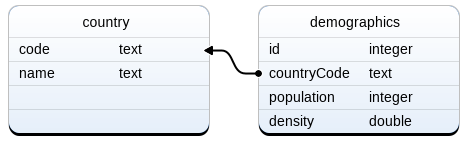
@@ -271,6 +271,8 @@ The **HasOne** association between a country and its demographics needs that the
|
||||
|
||||
|
||||
|
||||
Note that this demographics example of HasOne association uses an explicit `"demographics"` key, unlike the BelongsTo and HasMany associations above. This key is necessary when you use a plural name for a one-to-one association. See [TODO] for more information.
|
||||
|
||||
See [Convention for the HasOne Association] for some sample code that defines the database schema for such an association, and [Building Requests from Associations] in order to learn how to use it.
|
||||
|
||||
|
||||
@@ -299,7 +301,7 @@ struct Citizen: TableRecord, EncodableRecord {
|
||||
|
||||
|
||||
|
||||
The **HasManyThrough** association is also useful for setting up "shortcuts" through nested HasMany associations. For example, if a document has many sections, and a section has many paragraphs, you may sometimes want to get a simple collection of all paragraphs in the document. You could set that up this way:
|
||||
The **HasManyThrough** association is also useful for setting up "shortcuts" through nested associations. For example, if a document has many sections, and a section has many paragraphs, you may sometimes want to get a simple collection of all paragraphs in the document. You could set that up this way:
|
||||
|
||||
```swift
|
||||
struct Document: TableRecord {
|
||||
@@ -399,8 +401,8 @@ When designing your data model, you will sometimes find a record that should hav
|
||||
|
||||
```swift
|
||||
struct Employee {
|
||||
static let subordinates = hasMany(Employee.self)
|
||||
static let manager = belongsTo(Employee.self)
|
||||
static let subordinates = hasMany(Employee.self, key: "subordinates")
|
||||
static let manager = belongsTo(Employee.self, key: "manager")
|
||||
...
|
||||
}
|
||||
```
|
||||
@@ -421,6 +423,22 @@ migrator.registerMigration("Employees") { db in
|
||||
}
|
||||
```
|
||||
|
||||
Note that both sides of the self-join use a customized [association key]. This helps consuming this association. For example:
|
||||
|
||||
```swift
|
||||
struct EmployeeInfo: FetchableRecord, Decodable {
|
||||
var employee: Employee
|
||||
var manager: Employee?
|
||||
var subordinates: Set<Employee>
|
||||
}
|
||||
|
||||
let request = Employee
|
||||
.including(optional: Employee.manager)
|
||||
.including(all: Employee.subordinates)
|
||||
|
||||
let employeeInfos: [EmployeeInfo] = try EmployeeInfo.fetchAll(db, request)
|
||||
```
|
||||
|
||||
|
||||
Associations and the Database Schema
|
||||
====================================
|
||||
|
||||
@@ -1162,4 +1162,72 @@ class AssociationPrefetchingCodableRecordTests: GRDBTestCase {
|
||||
}
|
||||
}
|
||||
}
|
||||
|
||||
func testSelfJoin() throws {
|
||||
struct Employee: TableRecord, FetchableRecord, Decodable, Hashable {
|
||||
static let subordinates = hasMany(Employee.self, key: "subordinates")
|
||||
static let manager = belongsTo(Employee.self, key: "manager")
|
||||
var id: Int64
|
||||
var managerId: Int64?
|
||||
var name: String
|
||||
}
|
||||
|
||||
let dbQueue = try makeDatabaseQueue()
|
||||
try dbQueue.write { db in
|
||||
try db.create(table: "employee") { t in
|
||||
t.autoIncrementedPrimaryKey("id")
|
||||
t.column("managerId", .integer)
|
||||
.indexed()
|
||||
.references("employee", onDelete: .restrict)
|
||||
t.column("name", .text)
|
||||
}
|
||||
try db.execute(sql: """
|
||||
INSERT INTO employee (id, managerId, name) VALUES (1, NULL, 'Arthur');
|
||||
INSERT INTO employee (id, managerId, name) VALUES (2, 1, 'Barbara');
|
||||
INSERT INTO employee (id, managerId, name) VALUES (3, 1, 'Craig');
|
||||
INSERT INTO employee (id, managerId, name) VALUES (4, 2, 'David');
|
||||
INSERT INTO employee (id, managerId, name) VALUES (5, NULL, 'Eve');
|
||||
""")
|
||||
|
||||
struct EmployeeInfo: FetchableRecord, Decodable, Equatable {
|
||||
var employee: Employee
|
||||
var manager: Employee?
|
||||
var subordinates: Set<Employee>
|
||||
}
|
||||
|
||||
let request = Employee
|
||||
.including(optional: Employee.manager)
|
||||
.including(all: Employee.subordinates)
|
||||
.orderByPrimaryKey()
|
||||
|
||||
let employeeInfos: [EmployeeInfo] = try EmployeeInfo.fetchAll(db, request)
|
||||
XCTAssertEqual(employeeInfos, [
|
||||
EmployeeInfo(
|
||||
employee: Employee(id: 1, managerId: nil, name: "Arthur"),
|
||||
manager: nil,
|
||||
subordinates: [
|
||||
Employee(id: 2, managerId: 1, name: "Barbara"),
|
||||
Employee(id: 3, managerId: 1, name: "Craig"),
|
||||
]),
|
||||
EmployeeInfo(
|
||||
employee: Employee(id: 2, managerId: 1, name: "Barbara"),
|
||||
manager: Employee(id: 1, managerId: nil, name: "Arthur"),
|
||||
subordinates: [
|
||||
Employee(id: 4, managerId: 2, name: "David"),
|
||||
]),
|
||||
EmployeeInfo(
|
||||
employee: Employee(id: 3, managerId: 1, name: "Craig"),
|
||||
manager: Employee(id: 1, managerId: nil, name: "Arthur"),
|
||||
subordinates: []),
|
||||
EmployeeInfo(
|
||||
employee: Employee(id: 4, managerId: 2, name: "David"),
|
||||
manager: Employee(id: 2, managerId: 1, name: "Barbara"),
|
||||
subordinates: []),
|
||||
EmployeeInfo(
|
||||
employee: Employee(id: 5, managerId: nil, name: "Eve"),
|
||||
manager: nil,
|
||||
subordinates: []),
|
||||
])
|
||||
}
|
||||
}
|
||||
}
|
||||
Reference in new issue
Block a user