mirror of
https://github.com/groue/GRDB.swift
synced 2026-11-27 04:14:21 +00:00
Documentation
This commit is contained in:
 Gwendal Roué committed
1 parent
7a0a354d22
commit
466ecd5ba5
7 files changed
+58
-66
No files matched your search
@@ -429,15 +429,13 @@ The matching [migration] would look like:
|
||||
migrator.registerMigration("Employees") { db in
|
||||
try db.create(table: "employee") { t in
|
||||
t.autoIncrementedPrimaryKey("id")
|
||||
t.column("managerId", .integer)
|
||||
.indexed()
|
||||
.references("employee", onDelete: .restrict)
|
||||
t.belongsTo("manager", inTable: "employee", onDelete: .setNull)
|
||||
t.column("name", .text)
|
||||
}
|
||||
}
|
||||
```
|
||||
|
||||
Note that both sides of the self-join use a customized **[association key](#the-structure-of-a-joined-request)**. This helps consuming this association. For example:
|
||||
Note that the associations on both sides of the self-join use a customized **[association key](#the-structure-of-a-joined-request)**. This helps consuming this association. For example:
|
||||
|
||||
```swift
|
||||
struct EmployeeInfo: FetchableRecord, Decodable {
|
||||
@@ -536,20 +534,16 @@ migrator.registerMigration("Books and Authors") { db in
|
||||
}
|
||||
try db.create(table: "book") { t in
|
||||
t.autoIncrementedPrimaryKey("id")
|
||||
t.column("authorId", .integer) // (2)
|
||||
t.belongsTo("author", onDelete: .cascade) // (2)
|
||||
.notNull() // (3)
|
||||
.indexed() // (4)
|
||||
.references("author", onDelete: .cascade) // (5)
|
||||
t.column("title", .text)
|
||||
}
|
||||
}
|
||||
```
|
||||
|
||||
1. The `author` table has a primary key.
|
||||
2. The `book.authorId` column is used to link a book to the author it belongs to.
|
||||
2. The `book.authorId` column is used to link a book to the author it belongs to. This column is indexed in order to ease the selection of an author's books. A foreign key is defined from `book.authorId` column to `authors.id`, so that SQLite guarantees that no book refers to a missing author. The `onDelete: .cascade` option has SQLite automatically delete all of an author's books when that author is deleted. See [Foreign Key Actions] for more information.
|
||||
3. Make the `book.authorId` column not null if you want SQLite to guarantee that all books have an author.
|
||||
4. Create an index on the `book.authorId` column in order to ease the selection of an author's books.
|
||||
5. Create a foreign key from `book.authorId` column to `authors.id`, so that SQLite guarantees that no book refers to a missing author. The `onDelete: .cascade` option has SQLite automatically delete all of an author's books when that author is deleted. See [Foreign Key Actions] for more information.
|
||||
|
||||
The example above uses auto-incremented primary keys. But generally speaking, all primary keys are supported, including composite primary keys that span several columns.
|
||||
|
||||
@@ -595,20 +589,16 @@ migrator.registerMigration("Books and Authors") { db in
|
||||
}
|
||||
try db.create(table: "book") { t in
|
||||
t.autoIncrementedPrimaryKey("id")
|
||||
t.column("authorId", .integer) // (2)
|
||||
t.belongsTo("author", onDelete: .cascade) // (2)
|
||||
.notNull() // (3)
|
||||
.indexed() // (4)
|
||||
.references("author", onDelete: .cascade) // (5)
|
||||
t.column("title", .text)
|
||||
}
|
||||
}
|
||||
```
|
||||
|
||||
1. The `author` table has a primary key.
|
||||
2. The `book.authorId` column is used to link a book to the author it belongs to.
|
||||
2. The `book.authorId` column is used to link a book to the author it belongs to. This column is indexed in order to ease the selection of an author's books. A foreign key is defined from `book.authorId` column to `authors.id`, so that SQLite guarantees that no book refers to a missing author. The `onDelete: .cascade` option has SQLite automatically delete all of an author's books when that author is deleted. See [Foreign Key Actions] for more information.
|
||||
3. Make the `book.authorId` column not null if you want SQLite to guarantee that all books have an author.
|
||||
4. Create an index on the `book.authorId` column in order to ease the selection of an author's books.
|
||||
5. Create a foreign key from `book.authorId` column to `authors.id`, so that SQLite guarantees that no book refers to a missing author. The `onDelete: .cascade` option has SQLite automatically delete all of an author's books when that author is deleted. See [Foreign Key Actions] for more information.
|
||||
|
||||
The example above uses auto-incremented primary keys. But generally speaking, all primary keys are supported, including composite primary keys that span several columns.
|
||||
|
||||
@@ -654,10 +644,9 @@ migrator.registerMigration("Countries") { db in
|
||||
}
|
||||
try db.create(table: "demographics") { t in
|
||||
t.autoIncrementedPrimaryKey("id")
|
||||
t.column("countryCode", .text) // (2)
|
||||
t.belongsTo("country", onDelete: .cascade) // (2)
|
||||
.notNull() // (3)
|
||||
.unique() // (4)
|
||||
.references("country", onDelete: .cascade) // (5)
|
||||
t.column("population", .integer)
|
||||
t.column("density", .double)
|
||||
}
|
||||
@@ -665,10 +654,9 @@ migrator.registerMigration("Countries") { db in
|
||||
```
|
||||
|
||||
1. The `country` table has a primary key.
|
||||
2. The `demographics.countryCode` column is used to link a demographic profile to the country it belongs to.
|
||||
2. The `demographics.countryCode` column is used to link a demographic profile to the country it belongs to. This column is indexed in order to ease the selection of the demographics of a country. A foreign key is defined from `demographics.countryCode` column to `country.code`, so that SQLite guarantees that no profile refers to a missing country. The `onDelete: .cascade` option has SQLite automatically delete a profile when its country is deleted. See [Foreign Key Actions] for more information.
|
||||
3. Make the `demographics.countryCode` column not null if you want SQLite to guarantee that all profiles are linked to a country.
|
||||
4. Create a unique index on the `demographics.countryCode` column in order to guarantee the unicity of any country's profile.
|
||||
5. Create a foreign key from `demographics.countryCode` column to `country.code`, so that SQLite guarantees that no profile refers to a missing country. The `onDelete: .cascade` option has SQLite automatically delete a profile when its country is deleted. See [Foreign Key Actions] for more information.
|
||||
|
||||
The example above uses a string primary key for the "country" table. But generally speaking, all primary keys are supported, including composite primary keys that span several columns.
|
||||
|
||||
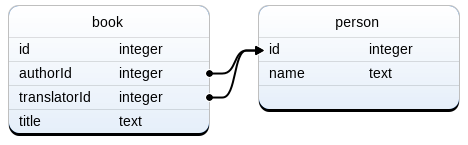
@@ -720,6 +708,22 @@ Sometimes the database schema does not define any foreign key. And sometimes, th
|
||||
|
||||
|
||||
|
||||
```swift
|
||||
// The migration that has created the above schema
|
||||
migrator.registerMigration("Library") { db in
|
||||
try db.create(table: "person") { t in
|
||||
t.autoIncrementedPrimaryKey("id")
|
||||
t.column("name", .text)
|
||||
}
|
||||
try db.create(table: "book") { t in
|
||||
t.autoIncrementedPrimaryKey("id")
|
||||
t.belongsTo("author", inTable: "person")
|
||||
t.belongsTo("translator", inTable: "person")
|
||||
t.column("title", .text)
|
||||
}
|
||||
}
|
||||
```
|
||||
|
||||
When this happens, associations can't be automatically inferred from the database schema. GRDB will complain with a fatal error such as "Ambiguous foreign key from book to person", or "Could not infer foreign key from book to person".
|
||||
|
||||
Your help is needed. You have to instruct GRDB which foreign key to use:
|
||||
|
||||
@@ -135,8 +135,8 @@ try db.create(table: "team") { t in
|
||||
try db.create(table: "membership") { t in
|
||||
// Composite primary key
|
||||
t.primaryKey {
|
||||
t.column("playerId", .integer).references("player")
|
||||
t.column("teamId", .text).references("team")
|
||||
t.belongsTo("player")
|
||||
t.belongsTo("team")
|
||||
}
|
||||
t.column("role", .text).notNull()
|
||||
}
|
||||
@@ -241,10 +241,10 @@ Unique indexes makes sure SQLite prevents the insertion of conflicting rows:
|
||||
// RECOMMENDED
|
||||
try db.create(table: "player") { t in
|
||||
t.autoIncrementedPrimaryKey("id")
|
||||
t.belongsTo("team").notNull()
|
||||
t.column("position", .integer).notNull()
|
||||
// Players must have distinct names
|
||||
t.column("name", .text).unique()
|
||||
t.column("teamId", .integer).notNull().references("team")
|
||||
t.column("position", .integer).notNull()
|
||||
}
|
||||
|
||||
// One single player at any given position in a team
|
||||
@@ -307,7 +307,7 @@ try db.create(table: "player") { t in
|
||||
t.autoIncrementedPrimaryKey("id")
|
||||
t.column("name", .text).notNull()
|
||||
// A player must refer to an existing team
|
||||
t.column("teamId", .integer).notNull().references("team")
|
||||
t.belongsTo("team").notNull()
|
||||
}
|
||||
|
||||
// REQUIRES EXTRA CONFIGURATION
|
||||
@@ -319,6 +319,8 @@ try db.create(table: "player") { t in
|
||||
}
|
||||
```
|
||||
|
||||
See ``TableDefinition/belongsTo(_:inTable:onDelete:onUpdate:deferred:indexed:)`` for more information about the creation of foreign keys.
|
||||
|
||||
GRDB [Associations](https://github.com/groue/GRDB.swift/blob/master/Documentation/AssociationsBasics.md) are automatically configured from foreign keys declared in the database schema:
|
||||
|
||||
```swift
|
||||
|
||||
@@ -26,10 +26,7 @@ migrator.registerMigration("Create authors") { db in
|
||||
migrator.registerMigration("Add books and author.birthYear") { db in
|
||||
try db.create(table: "book") { t in
|
||||
t.autoIncrementedPrimaryKey("id")
|
||||
t.column("authorId", .integer)
|
||||
.notNull()
|
||||
.indexed()
|
||||
.references("author", onDelete: .cascade)
|
||||
t.belongsTo("author").notNull()
|
||||
t.column("title", .text).notNull()
|
||||
}
|
||||
|
||||
|
||||
@@ -31,10 +31,8 @@ migrator.registerMigration("createLibrary") { db in
|
||||
try db.create(table: "book") { t in
|
||||
t.autoIncrementedPrimaryKey("id")
|
||||
t.column("title", .text).notNull() // (5)
|
||||
t.column("authorId", .integer) // (6)
|
||||
t.belongsTo("author", onDelete: .cascade) // (6)
|
||||
.notNull() // (7)
|
||||
.indexed() // (8)
|
||||
.references("author", onDelete: .cascade) // (9)
|
||||
}
|
||||
}
|
||||
|
||||
@@ -46,10 +44,8 @@ try migrator.migrate(dbQueue)
|
||||
3. An author must have a name.
|
||||
4. The country of an author is not always known.
|
||||
5. A book must have a title.
|
||||
6. The `book.authorId` column is used to link a book to the author it belongs to.
|
||||
6. The `book.authorId` column is used to link a book to the author it belongs to. This column is indexed in order to ease the selection of an author's books. A foreign key is defined from `book.authorId` column to `authors.id`, so that SQLite guarantees that no book refers to a missing author. The `onDelete: .cascade` option has SQLite automatically delete all of an author's books when that author is deleted. See [Foreign Key Actions](https://sqlite.org/foreignkeys.html#fk_actions) for more information.
|
||||
7. The `book.authorId` column is not null so that SQLite guarantees that all books have an author.
|
||||
8. The `book.authorId` column is indexed in order to ease the selection of an author's books.
|
||||
9. We define a foreign key from `book.authorId` column to `authors.id`, so that SQLite guarantees that no book can refer to a missing author. On top of that, the `onDelete: .cascade` option has SQLite automatically delete all of an author's books when that author is deleted. See [Foreign Key Actions](https://sqlite.org/foreignkeys.html#fk_actions) for more information.
|
||||
|
||||
Thanks to this database schema, the application will always process *consistent data*, no matter how wrong the Swift code can get. Even after a hard crash, all books will have an author, a non-nil title, etc.
|
||||
|
||||
|
||||
@@ -28,26 +28,23 @@
|
||||
/// }
|
||||
/// try db.create(table: "book") { t in
|
||||
/// t.autoIncrementedPrimaryKey("id")
|
||||
/// t.column("authorId", .integer) // (2)
|
||||
/// t.belongsTo("author", onDelete: .cascade) // (2)
|
||||
/// .notNull() // (3)
|
||||
/// .indexed() // (4)
|
||||
/// .references("author", onDelete: .cascade) // (5)
|
||||
/// t.column("title", .text)
|
||||
/// }
|
||||
/// ```
|
||||
///
|
||||
/// 1. The author table has a primary key.
|
||||
/// 2. The `book.authorId` column is used to link a book to the author it
|
||||
/// belongs to.
|
||||
/// belongs to. This column is indexed in order to ease the selection of
|
||||
/// an author's books. A foreign key is defined from `book.authorId`
|
||||
/// column to `authors.id`, so that SQLite guarantees that no book refers
|
||||
/// to a missing author. The `onDelete: .cascade` option has SQLite
|
||||
/// automatically delete all of an author's books when that author is
|
||||
/// deleted. See <https://sqlite.org/foreignkeys.html#fk_actions> for
|
||||
/// more information.
|
||||
/// 3. Make the `book.authorId` column not null if you want SQLite to guarantee
|
||||
/// that all books have an author.
|
||||
/// 4. Create an index on the `book.authorId` column in order to ease the
|
||||
/// selection of an author's books.
|
||||
/// 5. Create a foreign key from `book.authorId` column to `author.id`, so that
|
||||
/// SQLite guarantees that no book refers to a missing author. The
|
||||
/// `onDelete: .cascade` option has SQLite automatically delete all of an
|
||||
/// author's books when that author is deleted.
|
||||
/// See <https://sqlite.org/foreignkeys.html#fk_actions> for more information.
|
||||
///
|
||||
/// The example above uses auto-incremented primary keys. But generally
|
||||
/// speaking, all primary keys are supported.
|
||||
|
||||
@@ -28,26 +28,22 @@
|
||||
/// }
|
||||
/// try db.create(table: "book") { t in
|
||||
/// t.autoIncrementedPrimaryKey("id")
|
||||
/// t.column("authorId", .integer) // (2)
|
||||
/// t.belongsTo("author", onDelete: .cascade) // (2)
|
||||
/// .notNull() // (3)
|
||||
/// .indexed() // (4)
|
||||
/// .references("author", onDelete: .cascade) // (5)
|
||||
/// t.column("title", .text)
|
||||
/// }
|
||||
/// ```
|
||||
///
|
||||
/// 1. The author table has a primary key.
|
||||
/// 2. The `book.authorId` column is used to link a book to the author it
|
||||
/// belongs to.
|
||||
/// belongs to. This column is indexed in order to ease the selection of
|
||||
/// an author's books. A foreign key is defined from `book.authorId`
|
||||
/// column to `authors.id`, so that SQLite guarantees that no book refers
|
||||
/// to a missing author. The `onDelete: .cascade` option has SQLite
|
||||
/// automatically delete all of an author's books when that author is
|
||||
/// deleted. See <https://sqlite.org/foreignkeys.html#fk_actions> for
|
||||
/// more information.
|
||||
/// 3. Make the `book.authorId` column not null if you want SQLite to guarantee
|
||||
/// that all books have an author.
|
||||
/// 4. Create an index on the `book.authorId` column in order to ease the
|
||||
/// selection of an author's books.
|
||||
/// 5. Create a foreign key from `book.authorId` column to `author.id`, so that
|
||||
/// SQLite guarantees that no book refers to a missing author. The
|
||||
/// `onDelete: .cascade` option has SQLite automatically delete all of an
|
||||
/// author's books when that author is deleted.
|
||||
/// See <https://sqlite.org/foreignkeys.html#fk_actions> for more information.
|
||||
///
|
||||
/// The example above uses auto-incremented primary keys. But generally
|
||||
/// speaking, all primary keys are supported.
|
||||
|
||||
@@ -29,10 +29,9 @@
|
||||
/// }
|
||||
/// try db.create(table: "demographics") { t in
|
||||
/// t.autoIncrementedPrimaryKey("id")
|
||||
/// t.column("countryCode", .text) // (2)
|
||||
/// t.belongsTo("country", onDelete: .cascade) // (2)
|
||||
/// .notNull() // (3)
|
||||
/// .unique() // (4)
|
||||
/// .references("country", onDelete: .cascade) // (5)
|
||||
/// t.column("population", .integer)
|
||||
/// t.column("density", .double)
|
||||
/// }
|
||||
@@ -40,16 +39,17 @@
|
||||
///
|
||||
/// 1. The country table has a primary key.
|
||||
/// 2. The `demographics.countryCode` column is used to link a demographic
|
||||
/// profile to the country it belongs to.
|
||||
/// profile to the country it belongs to. This column is indexed in order
|
||||
/// to ease the selection of the demographics of a country. A foreign key
|
||||
/// is defined from `demographics.countryCode` column to `country.code`,
|
||||
/// so that SQLite guarantees that no profile refers to a missing
|
||||
/// country. The `onDelete: .cascade` option has SQLite automatically
|
||||
/// delete a profile when its country is deleted. See
|
||||
/// <https://sqlite.org/foreignkeys.html#fk_actions> for more information.
|
||||
/// 3. Make the `demographics.countryCode` column not null if you want SQLite to
|
||||
/// guarantee that all profiles are linked to a country.
|
||||
/// 4. Create a unique index on the `demographics.countryCode` column in order
|
||||
/// to guarantee the unicity of any country's demographics.
|
||||
/// 5. Create a foreign key from `demographics.countryCode` column to
|
||||
/// `country.code`, so that SQLite guarantees that no profile refers to a
|
||||
/// missing country. The `onDelete: .cascade` option has SQLite automatically
|
||||
/// delete a profile when its country is deleted.
|
||||
/// See <https://sqlite.org/foreignkeys.html#fk_actions> for more information.
|
||||
///
|
||||
/// The example above uses a string primary for the country table. But generally
|
||||
/// speaking, all primary keys are supported.
|
||||
|
||||
Reference in new issue
Block a user