mirror of
https://github.com/groue/GRDB.swift
synced 2026-11-27 04:14:21 +00:00
All fetches are stale
This commit is contained in:
 Gwendal Roué committed
1 parent
1070b9bd9d
commit
06827de207
2 files changed
+23
-6
No files matched your search
@@ -322,17 +322,34 @@ Despite the common [guarantees](#safe-and-unsafe-database-accesses) and [rules](
|
||||
|
||||
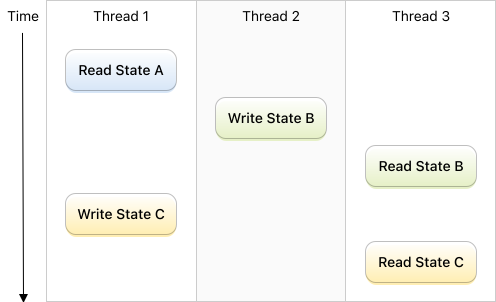
|
||||
|
||||
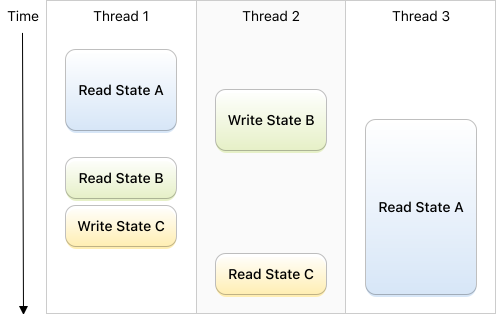
[DatabasePool] manages a pool of several database connections, and allows concurrent reads and writes. It serializes all writes (the [Serialized Writes] guarantee). Reads are isolated so that they don't see changes performed by other threads (the [Isolated Reads] guarantee). This gives a very different picture:
|
||||
[DatabasePool] manages a pool of several database connections, and allows concurrent reads and writes thanks to the [WAL mode](https://www.sqlite.org/wal.html). A database pool serializes all writes (the [Serialized Writes] guarantee). Reads are isolated so that they don't see changes performed by other threads (the [Isolated Reads] guarantee). This gives a very different picture:
|
||||
|
||||
|
||||
|
||||
See how, with database pools, two reads can see different database states at the same time. This may look scary, but there is a simple way to think about it. After all, most applications are generally interested in the latest state of the database:
|
||||
See how, with database pools, two reads can see different database states at the same time. This may look scary, but the correct way to think about it is that database queues are no less scary than database pools! Practically speaking, you can write robust code, if you consider that:
|
||||
|
||||
- You are sure, when you perform a write access, that you deal with the latest database state. This is because SQLite does not support parallel writes, even from other processes.
|
||||
- You are absolutely sure, when you perform a write access, that you deal with the latest database state. This is enforced by SQLite, which does simply not support parallel writes. To this end, database queues and pools make sure [only one thread can write](#guarantee-serialized-writes). And writes performed by other processes can only trigger [SQLITE_BUSY] errors that you can handle.
|
||||
|
||||
- When your application wants to synchronize the information displayed on screen with the database, use [ValueObservation].
|
||||
|
||||
For more information about database pools, grab information about SQLite [WAL mode](https://www.sqlite.org/wal.html) and [snapshot isolation](https://sqlite.org/isolation.html).
|
||||
- Whenever you fetch some data from a database queue or pool, it is better to consider it as _immediately_ stale. This is because nothing prevents other application threads or processes from overwriting the value you have just fetched:
|
||||
|
||||
<img align="right" src="https://github.com/groue/GRDB.swift/raw/development/Documentation/Images/ConcurrencyMeme.jpg" width="50%">
|
||||
|
||||
```swift
|
||||
// or dbQueue.write, for that matter
|
||||
let cookieCount = dbQueue.read { db in
|
||||
try Cookie.fetchCount(db)
|
||||
}
|
||||
|
||||
// At this point, the number of cookies on disk
|
||||
// may have already changed.
|
||||
print("There are \(cookieCount) cookies in the database")
|
||||
```
|
||||
|
||||
Fortunately:
|
||||
|
||||
- If you intend to display database values on screen, use [ValueObservation]: it always eventually notifies the latest state of the database. This way, you won't display stale values for a long time.
|
||||
|
||||
- The next write access is the perfect place to check your assumptions.
|
||||
|
||||
|
||||
## Advanced DatabasePool
|
||||
|
||||

Binary file not shown.
|
After Width: | Height: | Size: 161 KiB |
Reference in new issue
Block a user