 Gwendal Roué
d2dd18b3e5
Those are handled by Github now:
https://github.com/community/community/discussions/16925
23 KiB
🔀 Concurrency
GRDB helps your app deal with SQLite concurrency.
If your app moves slow database jobs off the main thread, so that the user interface remains responsive, then this guide is for you. In the case of apps that share a database with other processes, such as an iOS app and its extensions, don't miss the dedicated Sharing a Database guide after this one.
In all cases, and first and foremost, follow the Concurrency Rules right from the start.
The other chapters cover, with more details, the fundamentals of SQLite concurrency, and how GRDB makes it manageable from your Swift code.
- Concurrency Rules
- Synchronous and Asynchronous Database Accesses
- Safe and Unsafe Database Accesses
- Differences between Database Queues and Pools
- Concurrent Thinking
- Advanced DatabasePool
- Database Snapshots
- Sharing a Database
Concurrency Rules
The two concurrency rules are strongly recommended practices. They are all about SQLite, a robust and reliable database that takes great care of your data: don't miss an opportunity to put it on your side!
☝️ Rule 1: Connect to any database file only once
Open one single DatabaseQueue or DatabasePool per database file, for the whole duration of your use of the database. Not for the duration of each database access, but really for the duration of all database accesses to this file.
Why does this rule exist? - Since SQLite does not support parallel writes, each DatabaseQueue and DatabasePool makes sure application threads perform writes one by one, without overlap.
Practical advice - An app that uses a single database will connect only once. A document-based app will connect each time a document is opened, and disconnect when the document is closed. See the demo apps in order to see how to setup a UIKit or SwiftUI application for a single database.
What if you do not follow this rule?
- You will not be able to use the Database Observation features.
- You will see SQLite errors with code 5 (SQLITE_BUSY).
☝️ Rule 2: Mind your transactions
Database operations that are grouped in an SQLite transaction are guaranteed to be either fully saved on disk, or not at all. Read-only transactions have an interesting property as well: they guarantee a stable and immutable view of the database1 , and do not see changes performed by eventual concurrent writes. In other words, transactions are the one and single tool that helps you enforce and rely on the important invariants of your database (such as "all credits have a matching debit", or "all books have an author").
You are responsible, in your Swift code, for delimiting transactions. You do so by grouping database accesses inside a pair of { db in ... } brackets:
try dbQueue.write { db in /* Inside a transaction */ }
try dbQueue.read { db in /* Inside a transaction */ }
let observation = ValueObservation.tracking { db in /* Inside a transaction */ }`
Why does this rule exist? - Because GRDB and SQLite can not guess where to insert the transaction boundaries that protect the invariants of your database. This is your task.
Practical advice - See below a correct example, as well as frequent mistakes you should avoid:
Sample code
In order to insert a money transfer in the database, in a way that enforces the "all credits have a matching debit" invariant, you can write:
// CORRECT: the "all credits have a matching debit" invariant is preserved.
do {
    try dbQueue.write { db in
        try credit.insert(db)
        try debit.insert(db)
    }
} catch {
    print("An error occurred: \(error)")
}
A frequent mistake is to forget about grouping inside a pair of
{ db in ... }brackets:// INCORRECT. Related database operations are not grouped inside // one transaction. The invariant is not enforced. do { try dbQueue.write { db in try credit.insert(db) } try dbQueue.write { db in try debit.insert(db) } } catch { print("An error occurred: \(error)") }Another frequent mistake is to catch database errors at the wrong place:
// INCORRECT. Related database operations are not grouped inside
// one transaction, and a failed operation does not prevent
// subsequent operations from being performed. The invariant is
// not enforced.
do {
    try dbQueue.write { db in try credit.insert(db) }
} catch {
    print("An error occurred: \(error)")
}

do {
    try dbQueue.write { db in try debit.insert(db) }
} catch {
    print("An error occurred: \(error)")
}
What if you do not follow this rule? - You will see broken database invariants, at runtime, and when your apps wakes up after a crash. You may have a hard time fixing this mess.
Synchronous and Asynchronous Database Accesses
You can access the database from any thread, in a synchronous or asynchronous way.
➡️ A sync access blocks the current thread until the database operations are completed:
let playerCount = try dbQueue.read { db in
    try Player.fetchCount(db)
}

let newPlayerCount = try dbQueue.write { db -> Int in
    try Player(id: 12, name: "Arthur").insert(db)
    return try Player.fetchCount(db)
}
It is a programmer error to perform a sync access from any other database access (this restriction can be lifted: see Safe and Unsafe Database Accesses):
try dbQueue.write { db in
    // Fatal Error: Database methods are not reentrant.
    try dbQueue.write { db in ... }
}
🔀 An async access does not block the current thread. Instead, it notifies you when the database operations are completed. There are four ways to access the database asynchronously:
Swift concurrency (async/await)
🔥 EXPERIMENTAL GRDB support for Swift concurrency requires Xcode 13.3.1+.
let playerCount = try await dbQueue.read { db in
    try Player.fetchCount(db)
}

let newPlayerCount = try await dbQueue.write { db -> Int in
    try Player(id: 12, name: "Arthur").insert(db)
    return try Player.fetchCount(db)
}
Note the identical method names: read, write. The async version is only available in async Swift functions.
Combine publishers
let playerCountPublisher = dbQueue.readPublisher { db in
    try Player.fetchCount(db)
}

let newPlayerCountPublisher = dbQueue.writePublisher { db -> Int in
    try Player(id: 12, name: "Arthur").insert(db)
    return try Player.fetchCount(db)
}
Those publishers do not access the database until they are subscribed. They complete on the main dispatch queue by default. See GRDB ❤️ Combine.
RxSwift observables
let playerCountObservable = dbQueue.rx.read { db in
    try Player.fetchCount(db)
}

let newPlayerCountObservable = dbQueue.rx.write { db -> Int in
    try Player(id: 12, name: "Arthur").insert(db)
    return try Player.fetchCount(db)
}
Those observables do not access the database until they are subscribed. They complete on the main dispatch queue by default. See the companion library RxGRDB.
Completion blocks
dbQueue.asyncRead { (dbResult: Result<Database, Error>) in
    do {
        // Maybe read access could not be established
        let db = try dbResult.get()
        let playerCount = try Player.fetchCount(db)
        ... // Handle playerCount
    } catch {
        ... // Handle error
    }
}

dbQueue.asyncWrite({ (db: Database) -> Int in
    try Player(id: 12, name: "Arthur").insert(db)
    return try Player.fetchCount(db)
}, completion: { (db: Database, result: Result<Int, Error>) in
    // Handle write transaction result:
    switch result {
    case let .success(newPlayerCount):
        ... // Handle newPlayerCount
    case let .failure(error):
        ... // Handle error
    }
})
During one async access, all individual database operations grouped inside (fetch, insert, etc.) are synchronous:
// One asynchronous access...
try await dbQueue.write { db in
    // ... always performs synchronous database operations:
    try Player(...).insert(db)
    try Player(...).insert(db)
    let players = try Player.fetchAll(db)
}
This is true for all async techniques.
This prevents the database operations from various concurrent accesses from being interleaved, with disastrous consequences. For example, one access must not be able to issue a COMMIT statement in the middle of an unfinished concurrent write!
Safe and Unsafe Database Accesses
You will generally use the safe database access methods read and write. In this context, "safe" means that a database access is concurrency-friendly, because GRDB provides the following guarantees:
- Serialized Writes - All writes performed by one DatabaseQueue or DatabasePool instance are serialized. Why is it important? - this guarantee prevents SQLITE_BUSY errors during concurrent writes.
- Write Transactions - All writes are wrapped in a transaction. Why is it important? - concurrent reads can not see partial database updates (even reads performed by other processes).
- Isolated Reads - All reads are wrapped in a transaction. Why is it important? - an isolated read sees a stable and immutable state of the database1 , and does not see changes performed by eventual concurrent writes (even writes performed by other processes).
- Forbidden Writes - Inside a read access, all attempts to write raise an error. Why is it important? - this enforces the immutability of the database during a read.
- Non-Reentrancy - Database accesses are not reentrant. Why is it important? - this reduces the opportunities for deadlocks, and fosters the clear transaction boundaries of the second concurrency rule.
Some applications need to relax this safety net, in order to achieve specific SQLite operations. In this case, replace read and write with one of the methods below:
-
Write outside of any transaction
(Lifted guarantee: Write Transactions)try dbQueue.writeWithoutTransaction { db in ... }writeWithoutTransactionis also available as anasyncfunction. You can also useasyncWriteWithoutTransaction. -
Write outside of any transaction, and prevents concurrent reads
(Lifted guarantee: Write Transactions)try dbQueue.barrierWriteWithoutTransaction { db in ... }The barrier write guarantees an exclusive access to the database: the method blocks until all concurrent database accesses are completed, reads and writes, and postpones all other accesses until it completes.
There is a known limitation: database accesses performed by other processes, and reads performed by DatabaseSnapshot are out of scope of this barrier, and can run concurrently with the barrier.
You will use this method, for example, when you change the password of an encrypted database.
barrierWriteWithoutTransactionis also available as anasyncfunction. You can also useasyncBarrierWriteWithoutTransaction. -
Reentrant write outside of any transaction
(Lifted guarantees: Write Transactions, Non-Reentrancy)try dbQueue.unsafeReentrantWrite { db in ... }Reentrant writes can be performed from any other database access:
try dbQueue.write { db in // No fatal error try dbQueue.unsafeReentrantWrite { db in ... } }unsafeReentrantWritehas no async version. -
Read outside of any transaction
(Lifted guarantees: Isolated Reads, Forbidden Writes)try dbQueue.unsafeRead { db in ... }unsafeReadis also available as anasyncfunction. -
Reentrant read, outside of any transaction
(Lifted guarantees: Isolated Reads, Forbidden Writes, Non-Reentrancy)try dbQueue.unsafeReentrantRead { db in ... }Reentrant reads can be performed from any other database access:
try dbQueue.write { db in // No fatal error try dbQueue.unsafeReentrantRead { db in ... } }unsafeReentrantReadhas no async version.
☝️ By using one of the methods above, you become responsible of the thread-safety of your application. Please understand the consequences of lifting each concurrency guarantee. Some guarantees can also be restored at your convenience:
-
The Write Transactions and Isolated Reads guarantees can be restored at any point, by opening an explicit transaction. For example:
try dbQueue.writeWithoutTransaction { db in try db.inTransaction { ... return .commit } } -
The Forbidden Writes guarantee can only be lifted with DatabaseQueue. It can be restored with
PRAGMA query_only.
Differences between Database Queues and Pools
Despite the common guarantees and rules shared by database queues and pools, those two database accessors don't have the same behavior.
DatabaseQueue opens a single database connection, and serializes all database accesses, reads, and writes. There is never more than one thread that uses the database. In the image below, we see how three threads can see the database as time passes:

DatabasePool manages a pool of several database connections, and allows concurrent reads and writes thanks to the WAL mode. A database pool serializes all writes (the Serialized Writes guarantee). Reads are isolated so that they don't see changes performed by other threads (the Isolated Reads guarantee). This gives a very different picture:

See how, with database pools, two reads can see different database states at the same time. This may look scary! Please see the next Concurrent Thinking chapter below for a relief.
Concurrent Thinking
Despite their differences, you can write robust code that works equally well with both database queues and pools.
This allows your app to switch between queues and pools, at your convenience:
- The demo applications share the same database code for the on-disk pool that feeds the app, and the in-memory queue that feeds tests and SwiftUI previews. This makes sure tests and previews run fast, without any temporary file, with the same behavior as the app.
- Applications that perform slow write transactions (when saving a lot of data from a remote server, for example) may want to replace their queue with a pool so that the reads that feed their user interface can run in parallel.
All you need is a little "concurrent thinking", based on those two basic facts:
-
You are sure, when you perform a write access, that you deal with the latest database state on disk. This is enforced by SQLite, which simply can't perform parallel writes, and by GRDB database queues and pools, which make sure only one thread can write. As for writes performed by other processes, they can only trigger SQLITE_BUSY errors that you can handle.
-
Whenever you extract some data from a database access, immediately consider it as stale. It is stale, whether you use a database queue or a database pool. It is stale because nothing prevents other application threads or processes from overwriting the value you have just fetched:

// or dbQueue.write, for that matter
let cookieCount = dbPool.read { db in
    try Cookie.fetchCount(db)
}

// At this point, the number of cookies on disk
// may have already changed.
print("We have \(cookieCount) cookies left")
Does this mean you can't rely on anything? Of course not:
-
If you intend to display the database content on screen, use ValueObservation: it always eventually notifies the latest state of the database. You won't display stale values for a long time 2 .
-
As said above, the moment of truth is the next write access!
-
Advanced DatabasePool
DatabasePool is very concurrent, since all reads can run in parallel, and can even run during write operations. But writes are still serialized: at any given point in time, there is no more than a single thread that is writing into the database.
When your application modifies the database, and then reads some value that depends on those modifications, you may want to avoid blocking concurrent writes longer than necessary:
try dbPool.write { db in
    // Increment the number of players
    try Player(...).insert(db)
    try Player(...).insert(db)

    // Read the number of players. Concurrent writes are blocked :-(
    let newPlayerCount = try Player.fetchCount(db)
}
➡️ The solution is the concurrentRead method. It must be called from within a write access, outside of any transaction. It returns a future value which you consume any time later, with the wait() method.
let future: DatabaseFuture<Int> = try dbPool.writeWithoutTransaction { db in
    // Increment the number of players
    try db.inTransaction {
        try Player(...).insert(db)
        try Player(...).insert(db)
        return .commit
    }

    // <- Not in a transaction here
    let future = dbPool.concurrentRead { db
        try Player.fetchCount(db)
    }
    return future
}
// <- Concurrent writes can be performed :-)

// Wait and handle newPlayerCount
let newPlayerCount = try future.wait()
🔀 The async version of concurrentRead is asyncConcurrentRead:
try dbPool.writeWithoutTransaction { db in
    // Increment the number of players
    try db.inTransaction {
        try Player(...).insert(db)
        try Player(...).insert(db)
        return .commit
    }

    // <- Not in a transaction here
    dbPool.asyncConcurrentRead { dbResult in
        do {
            // Maybe read access could not be established
            let db = try dbResult.get()
            let newPlayerCount = try Player.fetchCount(db)
            // Handle newPlayerCount
        } catch {
            // Handle error
        }
    }
}
concurrentRead and asyncConcurrentRead block until they can guarantee their closure argument an isolated access to the database, in the exact state left by the last transaction. It then asynchronously executes this closure.
In the illustration below, the striped band shows the delay needed for the reading thread to acquire isolation. Until then, no other thread can write:
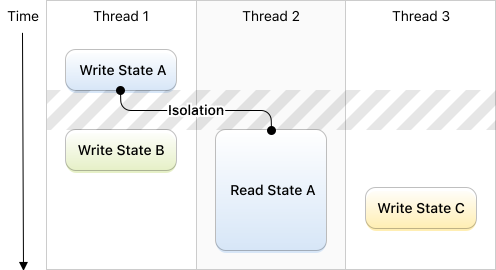
Transaction Observers can also use those methods in their databaseDidCommit method, in order to process database changes without blocking other threads that want to write into the database.
Database Snapshots
DatabasePool can take snapshots. A database snapshot sees an unchanging database content, as it existed at the moment it was created.
"Unchanging" means that a snapshot never sees any database modifications during all its lifetime. And yet it doesn't prevent database updates. This "magic" is made possible by SQLite's WAL mode (see Isolation In SQLite).
let snapshot = try dbPool.makeSnapshot()
You can create as many snapshots as you need, regardless of the maximum number of readers in the pool. A snapshot database connection is closed when the snapshot is deinitialized.
A snapshot can be used from any thread. It has the same synchronous and asynchronous reading methods as database queues and pools:
let playerCount = try snapshot.read { db in
    try Player.fetchCount(db)
}
When you want to control the latest committed changes seen by a snapshot, create the snapshot from within a write, outside of any transaction:
let snapshot1 = try dbPool.writeWithoutTransaction { db -> DatabaseSnapshot in
    try db.inTransaction {
        // delete all players
        try Player.deleteAll()
        return .commit
    }

    // <- not in a transaction here
    return dbPool.makeSnapshot()
}
// <- Other threads may modify the database here
let snapshot2 = try dbPool.makeSnapshot()

try snapshot1.read { db in
    // Guaranteed to be zero
    try Player.fetchCount(db)
}

try snapshot2.read { db in
    // Could be anything
    try Player.fetchCount(db)
}
Note
: snapshots currently serialize all database accesses. In the future, snapshots may allow concurrent reads.
-
This immutable view of the database is called snapshot isolation. ↩︎
-
After the database has been changed on disk, GRDB has to fetch the fresh value, and then hop to the main thread. Only then your screen can be updated. ↩︎