diff --git a/Documentation/Combine.md b/Documentation/Combine.md
index b181b62a6..78e95067d 100644
--- a/Documentation/Combine.md
+++ b/Documentation/Combine.md
@@ -191,7 +191,7 @@ let newPlayerCount = dbQueue.writePublisher { db -> Int in
The difference is that the last fetches are performed in the `thenRead` function. This function accepts two arguments: a readonly database connection, and the result of the `updates` function. This allows you to pass information from a function to the other (it is ignored in the sample code above).
-When you use a [database pool], this method applies a scheduling optimization: the `thenRead` function sees the database in the state left by the `updates` function, and yet does not block any concurrent writes. This can reduce database write contention. See [Advanced DatabasePool](Concurrency.md#advanced-databasepool) for more information.
+When you use a [database pool], this method applies a scheduling optimization: the `thenRead` function sees the database in the state left by the `updates` function, and yet does not block any concurrent writes. This can reduce database write contention.
When you use a [database queue], the results are guaranteed to be identical, but no scheduling optimization is applied.
@@ -402,5 +402,5 @@ let cancellable = hallOfFamePublisher.sink(
[configured]: ../README.md#databasepool-configuration
[database pool]: ../README.md#database-pools
[database queue]: ../README.md#database-queues
-[database snapshot]: Concurrency.md#database-snapshots
+[database snapshot]: https://groue.github.io/GRDB.swift/docs/6.3/documentation/grdb/databasesnapshot
[scheduler]: https://developer.apple.com/documentation/combine/scheduler
diff --git a/Documentation/Concurrency.md b/Documentation/Concurrency.md
index e1a739da2..ff05799af 100644
--- a/Documentation/Concurrency.md
+++ b/Documentation/Concurrency.md
@@ -1,534 +1,4 @@
:twisted_rightwards_arrows: Concurrency
=======================================
-**GRDB helps your app deal with SQLite concurrency.**
-
-If your app moves slow database jobs off the main thread, so that the user interface remains responsive, then this guide is for you. In the case of apps that share a database with other processes, such as an iOS app and its extensions, don't miss the dedicated [Sharing a Database] guide after this one.
-
-**In all cases, and first and foremost, follow the [Concurrency Rules] right from the start.**
-
-The other chapters cover, with more details, the fundamentals of SQLite concurrency, and how GRDB makes it manageable from your Swift code.
-
-- [Concurrency Rules]
-- [Synchronous and Asynchronous Database Accesses]
-- [Safe and Unsafe Database Accesses]
-- [Differences between Database Queues and Pools]
-- [Concurrent Thinking]
-- [Advanced DatabasePool]
-- [Database Snapshots]
-- [Sharing a Database]
-
-
-## Concurrency Rules
-
-**The two concurrency rules are strongly recommended practices.** They are all about SQLite, a robust and reliable database that takes great care of your data: don't miss an opportunity to put it on your side!
-
-:point_up: **[Rule 1](#rule-1): Connect to any database file only once**
-
-Open one single [DatabaseQueue] or [DatabasePool] per database file, for the whole duration of your use of the database. Not for the duration of _each_ database access, but really for the duration of _all_ database accesses to this file.
-
-> *Why does this rule exist?* - Since SQLite does not support parallel writes, each [DatabaseQueue] and [DatabasePool] makes sure application threads perform writes one by one, without overlap.
->
-> *Practical advice* - An app that uses a single database will connect only once. A document-based app will connect each time a document is opened, and disconnect when the document is closed. See the [demo apps] in order to see how to setup a UIKit or SwiftUI application for a single database.
->
-> *What if you do not follow this rule?*
->
-> - You will not be able to use the [Database Observation] features.
-> - You will see SQLite errors with code 5 ([SQLITE_BUSY]).
-
-:point_up: **[Rule 2](#rule-2): Mind your transactions**
-
-Database operations that are grouped in an SQLite transaction are guaranteed to be either fully saved on disk, or not at all. Read-only transactions have an interesting property as well: they guarantee a stable and immutable view of the database[^1], and do not see changes performed by eventual concurrent writes. In other words, transactions are the one and single tool that helps you enforce and rely on the important invariants of your database (such as "all credits have a matching debit", or "all books have an author").
-
-**You are responsible**, in your Swift code, for delimiting transactions. You do so by grouping database accesses inside a pair of `{ db in ... }` brackets:
-
-```swift
-try dbQueue.write { db in /* Inside a transaction */ }
-try dbQueue.read { db in /* Inside a transaction */ }
-let observation = ValueObservation.tracking { db in /* Inside a transaction */ }`
-```
-
-> *Why does this rule exist?* - Because GRDB and SQLite can not guess where to insert the transaction boundaries that protect the invariants of your database. This is your task.
->
-> *Practical advice* - See below a correct example, as well as frequent mistakes you should avoid:
->
-> Sample code
->
-> In order to insert a money transfer in the database, in a way that enforces the "all credits have a matching debit" invariant, you can write:
->
-> ```swift
-> // CORRECT: the "all credits have a matching debit" invariant is preserved.
-> do {
-> try dbQueue.write { db in
-> try credit.insert(db)
-> try debit.insert(db)
-> }
-> } catch {
-> print("An error occurred: \(error)")
-> }
-> ```
->
-> A frequent mistake is to forget about grouping inside a pair of `{ db in ... }` brackets:
->
-> ```swift
-> // INCORRECT. Related database operations are not grouped inside
-> // one transaction. The invariant is not enforced.
-> do {
-> try dbQueue.write { db in try credit.insert(db) }
-> try dbQueue.write { db in try debit.insert(db) }
-> } catch {
-> print("An error occurred: \(error)")
-> }
-> ```
->
-> Another frequent mistake is to catch database errors at the wrong place:
->
-> ```swift
-> // INCORRECT. Related database operations are not grouped inside
-> // one transaction, and a failed operation does not prevent
-> // subsequent operations from being performed. The invariant is
-> // not enforced.
-> do {
-> try dbQueue.write { db in try credit.insert(db) }
-> } catch {
-> print("An error occurred: \(error)")
-> }
->
-> do {
-> try dbQueue.write { db in try debit.insert(db) }
-> } catch {
-> print("An error occurred: \(error)")
-> }
-> ```
->
->
- Swift concurrency (async/await)
-
-[**:fire: EXPERIMENTAL**](../README.md#what-are-experimental-features)
-
-```swift
-let playerCount = try await dbQueue.read { db in
- try Player.fetchCount(db)
-}
-
-let newPlayerCount = try await dbQueue.write { db -> Int in
- try Player(name: "Arthur").insert(db)
- return try Player.fetchCount(db)
-}
-```
-
-Note the identical method names: `read`, `write`. The async version is only available in async Swift functions.
-
-
-
-
- Combine publishers
-
-```swift
-let playerCountPublisher = dbQueue.readPublisher { db in
- try Player.fetchCount(db)
-}
-
-let newPlayerCountPublisher = dbQueue.writePublisher { db -> Int in
- try Player(name: "Arthur").insert(db)
- return try Player.fetchCount(db)
-}
-```
-
-Those publishers do not access the database until they are subscribed. They complete on the main dispatch queue by default. See [GRDB ❤️ Combine].
-
-
-
-
- RxSwift observables
-
-```swift
-let playerCountObservable = dbQueue.rx.read { db in
- try Player.fetchCount(db)
-}
-
-let newPlayerCountObservable = dbQueue.rx.write { db -> Int in
- try Player(name: "Arthur").insert(db)
- return try Player.fetchCount(db)
-}
-```
-
-Those observables do not access the database until they are subscribed. They complete on the main dispatch queue by default. See the companion library [RxGRDB].
-
-
-
-
- Completion blocks
-
-```swift
-dbQueue.asyncRead { (dbResult: Result) in
- do {
- let db = try dbResult.get()
- let playerCount = try Player.fetchCount(db)
- } catch {
- // Handle error
- }
-}
-
-dbQueue.asyncWrite { (db: Database) -> Int in
- try Player(name: "Arthur").insert(db)
- return try Player.fetchCount(db)
-} completion: { (db: Database, result: Result) in
- switch result {
- case let .success(newPlayerCount):
- // Handle success
- case let .failure(error):
- // Handle error
- }
-}
-```
-
-
-
-During one async access, all individual database operations grouped inside (fetch, insert, etc.) are synchronous:
-
-```swift
-// One asynchronous access...
-try await dbQueue.write { db in
- // ... always performs synchronous database operations:
- try Player(...).insert(db)
- try Player(...).insert(db)
- let players = try Player.fetchAll(db)
-}
-```
-
-This is true for all async techniques.
-
-This prevents the database operations from various concurrent accesses from being interleaved, with disastrous consequences. For example, one access must not be able to issue a `COMMIT` statement in the middle of an unfinished concurrent write!
-
-
-## Safe and Unsafe Database Accesses
-
-**You will generally use the safe database access methods `read` and `write`.** In this context, "safe" means that a database access is concurrency-friendly, because GRDB provides the following guarantees:
-
-- **[Serialized Writes]** - All writes performed by one [DatabaseQueue] or [DatabasePool] instance are serialized. *Why is it important?* - this guarantee prevents [SQLITE_BUSY] errors during concurrent writes.
-- **[Write Transactions]** - All writes are wrapped in a transaction. *Why is it important?* - concurrent reads can not see partial database updates (even reads performed by other processes).
-- **[Isolated Reads]** - All reads are wrapped in a transaction. *Why is it important?* - an isolated read sees a stable and immutable state of the database[^1], and does not see changes performed by eventual concurrent writes (even writes performed by other processes).
-- **[Forbidden Writes]** - Inside a read access, all attempts to write raise an error. *Why is it important?* - this enforces the immutability of the database during a read.
-- **[Non-Reentrancy]** - Database accesses are not reentrant. *Why is it important?* - this reduces the opportunities for deadlocks, and fosters the clear transaction boundaries of the [second concurrency rule](#rule-2).
-
-Some applications need to relax this safety net, in order to achieve specific SQLite operations. In this case, replace `read` and `write` with one of the methods below:
-
-- **Write outside of any transaction**
- (Lifted guarantee: [Write Transactions])
-
- ```swift
- try dbQueue.writeWithoutTransaction { db in ... }
- ```
-
- `writeWithoutTransaction` is also available as an `async` function. You can also use `asyncWriteWithoutTransaction`.
-
-- **Write outside of any transaction, and prevents concurrent reads**
- (Lifted guarantee: [Write Transactions])
-
- ```swift
- try dbQueue.barrierWriteWithoutTransaction { db in ... }
- ```
-
- The barrier write guarantees an exclusive access to the database: the method blocks until all concurrent database accesses are completed, reads and writes, and postpones all other accesses until it completes.
-
- There is a known limitation: database accesses performed by other processes, and reads performed by [DatabaseSnapshot] are out of scope of this barrier, and can run concurrently with the barrier.
-
- You will use this method, for example, when you [change the password](../README.md#changing-the-passphrase-of-an-encrypted-database) of an encrypted database.
-
- `barrierWriteWithoutTransaction` is also available as an `async` function. You can also use `asyncBarrierWriteWithoutTransaction`.
-
-- **Reentrant write outside of any transaction**
- (Lifted guarantees: [Write Transactions], [Non-Reentrancy])
-
- ```swift
- try dbQueue.unsafeReentrantWrite { db in ... }
- ```
-
- Reentrant writes can be performed from any other database access:
-
- ```swift
- try dbQueue.write { db in
- // No fatal error
- try dbQueue.unsafeReentrantWrite { db in ... }
- }
- ```
-
- `unsafeReentrantWrite` has no async version.
-
-- **Read outside of any transaction**
- (Lifted guarantees: [Isolated Reads], [Forbidden Writes])
-
- ```swift
- try dbQueue.unsafeRead { db in ... }
- ```
-
- `unsafeRead` is also available as an `async` function.
-
-- **Reentrant read, outside of any transaction**
- (Lifted guarantees: [Isolated Reads], [Forbidden Writes], [Non-Reentrancy])
-
- ```swift
- try dbQueue.unsafeReentrantRead { db in ... }
- ```
-
- Reentrant reads can be performed from any other database access:
-
- ```swift
- try dbQueue.write { db in
- // No fatal error
- try dbQueue.unsafeReentrantRead { db in ... }
- }
- ```
-
- `unsafeReentrantRead` has no async version.
-
-:point_up: **By using one of the methods above, you become responsible of the thread-safety of your application.** Please understand the consequences of lifting each concurrency guarantee. Some guarantees can also be restored at your convenience:
-
-- The [Write Transactions] and [Isolated Reads] guarantees can be restored at any point, by opening an [explicit transaction](../README.md#transactions-and-savepoints). For example:
-
- ```swift
- try dbQueue.writeWithoutTransaction { db in
- try db.inTransaction {
- ...
- return .commit
- }
- }
- ```
-
-- The [Forbidden Writes] guarantee can only be lifted with [DatabaseQueue]. It can be restored with [`PRAGMA query_only`](https://www.sqlite.org/pragma.html#pragma_query_only).
-
-
-## Differences between Database Queues and Pools
-
-Despite the common [guarantees](#safe-and-unsafe-database-accesses) and [rules](#concurrency-rules) shared by database queues and pools, those two database accessors don't have the same behavior.
-
-[DatabaseQueue] opens a single database connection, and serializes all database accesses, reads, and writes. There is never more than one thread that uses the database. In the image below, we see how three threads can see the database as time passes:
-
-
-
-[DatabasePool] manages a pool of several database connections, and allows concurrent reads and writes thanks to the [WAL mode](https://www.sqlite.org/wal.html). A database pool serializes all writes (the [Serialized Writes] guarantee). Reads are isolated so that they don't see changes performed by other threads (the [Isolated Reads] guarantee). This gives a very different picture:
-
-
-
-See how, with database pools, two reads can see different database states at the same time. This may look scary! Please see the next [Concurrent Thinking] chapter below for a relief.
-
-
-## Concurrent Thinking
-
-Despite their [differences](#differences-between-database-queues-and-pools), you can write robust code that works equally well with both database queues and pools.
-
-This allows your app to switch between queues and pools, at your convenience:
-
-- The [demo applications] share the same database code for the on-disk pool that feeds the app, and the in-memory queue that feeds tests and SwiftUI previews. This makes sure tests and previews run fast, without any temporary file, with the same behavior as the app.
-- Applications that perform slow write transactions (when saving a lot of data from a remote server, for example) may want to replace their queue with a pool so that the reads that feed their user interface can run in parallel.
-
-All you need is a little "concurrent thinking", based on those two basic facts:
-
-- You are sure, when you perform a write access, that you deal with the latest database state on disk. This is enforced by SQLite, which simply can't perform parallel writes, and by GRDB database queues and pools, which make sure [only one thread can write](#guarantee-serialized-writes). As for writes performed by other processes, they can only trigger [SQLITE_BUSY] errors [that you can handle](SharingADatabase.md).
-
-- Whenever you extract some data from a database access, immediately consider it as _stale_. It is stale, whether you use a database queue or a database pool. It is stale because nothing prevents other application threads or processes from overwriting the value you have just fetched:
-
-  -
- ```swift
- // or dbQueue.write, for that matter
- let cookieCount = dbPool.read { db in
- try Cookie.fetchCount(db)
- }
-
- // At this point, the number of cookies on disk
- // may have already changed.
- print("We have \(cookieCount) cookies left")
- ```
-
- Does this mean you can't rely on anything? Of course not:
-
- - If you intend to display the database content on screen, use [ValueObservation]: it always eventually notifies the latest state of the database. You won't display stale values for a long time [^2].
-
- - As said above, the moment of truth is the next write access!
-
-
-## Advanced DatabasePool
-
-[DatabasePool] is very concurrent, since all reads can run in parallel, and can even run during write operations. But writes are still serialized: at any given point in time, there is no more than a single thread that is writing into the database.
-
-When your application modifies the database, and then reads some value that depends on those modifications, you may want to avoid blocking concurrent writes longer than necessary:
-
-```swift
-try dbPool.write { db in
- // Increment the number of players
- try Player(...).insert(db)
- try Player(...).insert(db)
-
- // Read the number of players. Concurrent writes are blocked :-(
- let newPlayerCount = try Player.fetchCount(db)
-}
-```
-
-:arrow_right: The solution is the `concurrentRead` method. It must be called from within a write access, outside of any transaction. It returns a *future value* which you consume any time later, with the `wait()` method.
-
-```swift
-let future: DatabaseFuture = try dbPool.writeWithoutTransaction { db in
- // Increment the number of players
- try db.inTransaction {
- try Player(...).insert(db)
- try Player(...).insert(db)
- return .commit
- }
-
- // <- Not in a transaction here
- let future = dbPool.concurrentRead { db
- try Player.fetchCount(db)
- }
- return future
-}
-// <- Concurrent writes can be performed :-)
-
-// Wait and handle newPlayerCount
-let newPlayerCount = try future.wait()
-```
-
-:twisted_rightwards_arrows: The async version of `concurrentRead` is `asyncConcurrentRead`:
-
-```swift
-try dbPool.writeWithoutTransaction { db in
- // Increment the number of players
- try db.inTransaction {
- try Player(...).insert(db)
- try Player(...).insert(db)
- return .commit
- }
-
- // <- Not in a transaction here
- dbPool.asyncConcurrentRead { dbResult in
- do {
- // Maybe read access could not be established
- let db = try dbResult.get()
- let newPlayerCount = try Player.fetchCount(db)
- // Handle newPlayerCount
- } catch {
- // Handle error
- }
- }
-}
-```
-
-`concurrentRead` and `asyncConcurrentRead` block until they can guarantee their closure argument an isolated access to the database, in the exact state left by the last transaction. It then asynchronously executes this closure.
-
-In the illustration below, the striped band shows the delay needed for the reading thread to acquire isolation. Until then, no other thread can write:
-
-
-
-[Transaction Observers](../README.md#transactionobserver-protocol) can also use those methods in their `databaseDidCommit` method, in order to process database changes without blocking other threads that want to write into the database.
-
-
-## Database Snapshots
-
-**[DatabasePool] can take snapshots.** A database snapshot sees an unchanging database content, as it existed at the moment it was created.
-
-"Unchanging" means that a snapshot never sees any database modifications during all its lifetime. And yet it doesn't prevent database updates. This "magic" is made possible by SQLite's WAL mode (see [Isolation In SQLite](https://sqlite.org/isolation.html)).
-
-```swift
-let snapshot = try dbPool.makeSnapshot()
-```
-
-You can create as many snapshots as you need, regardless of the [maximum number of readers](../README.md#database-configuration) in the pool. A snapshot database connection is closed when the snapshot is deinitialized.
-
-**A snapshot can be used from any thread.** It has the same [synchronous and asynchronous reading methods](#synchronous-and-asynchronous-database-accesses) as database queues and pools:
-
-```swift
-let playerCount = try snapshot.read { db in
- try Player.fetchCount(db)
-}
-```
-
-When you want to control the latest committed changes seen by a snapshot, create the snapshot from within a write, outside of any transaction:
-
-```swift
-let snapshot1 = try dbPool.writeWithoutTransaction { db -> DatabaseSnapshot in
- try db.inTransaction {
- // delete all players
- try Player.deleteAll()
- return .commit
- }
-
- // <- not in a transaction here
- return dbPool.makeSnapshot()
-}
-// <- Other threads may modify the database here
-let snapshot2 = try dbPool.makeSnapshot()
-
-try snapshot1.read { db in
- // Guaranteed to be zero
- try Player.fetchCount(db)
-}
-
-try snapshot2.read { db in
- // Could be anything
- try Player.fetchCount(db)
-}
-```
-
-> **Note**: snapshots currently serialize all database accesses. In the future, snapshots may allow concurrent reads.
-
-[^1]: This immutable view of the database is called [snapshot isolation](https://www.sqlite.org/isolation.html).
-
-[^2]: After the database has been changed on disk, GRDB has to fetch the fresh value, and then hop to the main thread. Only then your screen can be updated.
-
-[Concurrency Rules]: #concurrency-rules
-[Synchronous and Asynchronous Database Accesses]: #synchronous-and-asynchronous-database-accesses
-[Safe and Unsafe Database Accesses]: #safe-and-unsafe-database-accesses
-[Differences between Database Queues and Pools]: #differences-between-database-queues-and-pools
-[Concurrent Thinking]: #concurrent-thinking
-[Advanced DatabasePool]: #advanced-databasepool
-[Database Snapshots]: #database-snapshots
-[DatabaseQueue]: ../README.md#database-queues
-[DatabasePool]: ../README.md#database-pools
-[DatabaseSnapshot]: #database-snapshots
-[demo apps]: DemoApps
-[Database Observation]: ../README.md#database-changes-observation
-[SQLITE_BUSY]: https://www.sqlite.org/rescode.html#busy
-[Sharing a Database]: SharingADatabase.md
-[ValueObservation]: ../README.md#valueobservation
-[GRDB ❤️ Combine]: Combine.md
-[RxGRDB]: https://github.com/RxSwiftCommunity/RxGRDB
-[Serialized Writes]: #guarantee-serialized-writes
-[Write Transactions]: #guarantee-write-transactions
-[Isolated Reads]: #guarantee-isolated-reads
-[Forbidden Writes]: #guarantee-forbidden-writes
-[Non-Reentrancy]: #guarantee-non-reentrancy
-[demo applications]: DemoApps
+This guide [has moved](https://groue.github.io/GRDB.swift/docs/6.3/documentation/grdb/concurrency).
diff --git a/Documentation/GoodPracticesForDesigningRecordTypes.md b/Documentation/GoodPracticesForDesigningRecordTypes.md
index 480606c30..b9bc82fc6 100644
--- a/Documentation/GoodPracticesForDesigningRecordTypes.md
+++ b/Documentation/GoodPracticesForDesigningRecordTypes.md
@@ -807,8 +807,8 @@ Instead, have a look at [Database Observation]:
[migrations]: https://groue.github.io/GRDB.swift/docs/6.3/documentation/grdb/migrations
[migration]: https://groue.github.io/GRDB.swift/docs/6.3/documentation/grdb/migrations
[Foreign Key Actions]: https://sqlite.org/foreignkeys.html#fk_actions
-[Concurrency Guide]: Concurrency.md
-[GRDB concurrency rules]: Concurrency.md#concurrency-rules
+[Concurrency Guide]: https://groue.github.io/GRDB.swift/docs/6.3/documentation/grdb/concurrency
+[GRDB concurrency rules]: https://groue.github.io/GRDB.swift/docs/6.3/documentation/grdb/concurrency
[PersistableRecord]: ../README.md#persistablerecord-protocol
[Database Observation]: ../README.md#database-changes-observation
[ValueObservation]: ../README.md#valueobservation
diff --git a/Documentation/SharingADatabase.md b/Documentation/SharingADatabase.md
index b0f59761f..81910f624 100644
--- a/Documentation/SharingADatabase.md
+++ b/Documentation/SharingADatabase.md
@@ -1,294 +1,4 @@
Sharing a Database
==================
-**This guide describes a recommended setup that applies as soon as several processes want to access the same SQLite database.** It complements the [Concurrency](Concurrency.md) guide, that you should read first.
-
-On iOS for example, you can share database files between multiple processes by storing them in an [App Group Container](https://developer.apple.com/documentation/foundation/nsfilemanager/1412643-containerurlforsecurityapplicati). On macOS as well, several processes may want to open the same database, according to their particular sandboxing contexts.
-
-Accessing a shared database from several SQLite connections, from several processes, creates challenges at various levels:
-
-1. **Database setup** may be attempted by multiple processes, concurrently.
-2. **SQLite** may throw `SQLITE_BUSY` errors, code 5, "database is locked".
-3. **iOS** may kill your application with a `0xDEAD10CC` exception.
-4. **GRDB** database observation misses changes performed by external processes.
-
-We'll address all of those challenges below.
-
-- [Use a Database Pool]
-- [How to limit the `SQLITE_BUSY` error]
-- [How to limit the `0xDEAD10CC` exception]
-- [How to perform cross-process database observation]
-
-
-## Use a Database Pool
-
-In order to access a shared database, use a [Database Pool]. It opens the database in the [WAL mode](https://www.sqlite.org/wal.html), which helps sharing a database.
-
-Since several processes may open the database at the same time, protect the creation of the database pool with an [NSFileCoordinator].
-
-- In a process that can create and write in the database, use this sample code:
-
- ```swift
- /// Returns an initialized database pool at the shared location databaseURL
- func openSharedDatabase(at databaseURL: URL) throws -> DatabasePool {
- let coordinator = NSFileCoordinator(filePresenter: nil)
- var coordinatorError: NSError?
- var dbPool: DatabasePool?
- var dbError: Error?
- coordinator.coordinate(writingItemAt: databaseURL, options: .forMerging, error: &coordinatorError, byAccessor: { url in
- do {
- dbPool = try openDatabase(at: url)
- } catch {
- dbError = error
- }
- })
- if let error = dbError ?? coordinatorError {
- throw error
- }
- return dbPool!
- }
-
- private func openDatabase(at databaseURL: URL) throws -> DatabasePool {
- var configuration = Configuration()
- configuration.prepareDatabase { db in
- // Activate the persistent WAL mode so that
- // readonly processes can access the database.
- //
- // See https://www.sqlite.org/walformat.html#operations_that_require_locks_and_which_locks_those_operations_use
- // and https://www.sqlite.org/c3ref/c_fcntl_begin_atomic_write.html#sqlitefcntlpersistwal
- if db.configuration.readonly == false {
- var flag: CInt = 1
- let code = withUnsafeMutablePointer(to: &flag) { flagP in
- sqlite3_file_control(db.sqliteConnection, nil, SQLITE_FCNTL_PERSIST_WAL, flagP)
- }
- guard code == SQLITE_OK else {
- throw DatabaseError(resultCode: ResultCode(rawValue: code))
- }
- }
- }
- let dbPool = try DatabasePool(path: databaseURL.path, configuration: configuration)
-
- // Perform here other database setups, such as defining
- // the database schema with a DatabaseMigrator, and
- // checking if the application can open the file:
- try migrator.migrate(dbPool)
- if try dbPool.read(migrator.hasBeenSuperseded) {
- // Database is too recent
- throw /* some error */
- }
-
- return dbPool
- }
- ```
-
-- In a process that only reads in the database, use this sample code:
-
- ```swift
- /// Returns an initialized database pool at the shared location databaseURL,
- /// or nil if the database is not created yet, or does not have the required
- /// schema version.
- func openSharedReadOnlyDatabase(at databaseURL: URL) throws -> DatabasePool? {
- let coordinator = NSFileCoordinator(filePresenter: nil)
- var coordinatorError: NSError?
- var dbPool: DatabasePool?
- var dbError: Error?
- coordinator.coordinate(readingItemAt: databaseURL, options: .withoutChanges, error: &coordinatorError, byAccessor: { url in
- do {
- dbPool = try openReadOnlyDatabase(at: url)
- } catch {
- dbError = error
- }
- })
- if let error = dbError ?? coordinatorError {
- throw error
- }
- return dbPool
- }
-
- private func openReadOnlyDatabase(at databaseURL: URL) throws -> DatabasePool? {
- do {
- var configuration = Configuration()
- configuration.readonly = true
- let dbPool = try DatabasePool(path: databaseURL.path, configuration: configuration)
-
- // Check here if the database schema is the expected one,
- // for example with a DatabaseMigrator:
- return try dbPool.read { db in
- if try migrator.hasBeenSuperseded(db) {
- // Database is too recent
- return nil
- } else if try migrator.hasCompletedMigrations(db) == false {
- // Database is too old
- return nil
- }
- return dbPool
- }
- } catch {
- if FileManager.default.fileExists(atPath: databaseURL.path) {
- throw error
- } else {
- return nil
- }
- }
- }
- ```
-
-
-#### The specific case of readonly connections
-
-Readonly connections will fail unless two extra files ending in `-shm` and `-wal` are present next to the database file ([source](https://www.sqlite.org/walformat.html#operations_that_require_locks_and_which_locks_those_operations_use)). Those files are regular companions of databases in the [WAL mode]. But they are deleted, under regular operations, when database connections are closed. Precisely speaking, they *may* be deleted: it depends on the SQLite and the operating system versions ([source](https://github.com/groue/GRDB.swift/issues/739#issuecomment-604363998)). And when they are deleted, readonly connections fail.
-
-The solution is to enable the "persistent WAL mode", as shown in the sample code above, by setting the [SQLITE_FCNTL_PERSIST_WAL](https://www.sqlite.org/c3ref/c_fcntl_begin_atomic_write.html#sqlitefcntlpersistwal) flag. This mode makes sure the `-shm` and `-wal` files are never deleted, and guarantees a database access to readonly connections.
-
-
-## How to limit the `SQLITE_BUSY` error
-
-> The SQLITE_BUSY result code indicates that the database file could not be written (or in some cases read) because of concurrent activity by some other database connection, usually a database connection in a separate process.
-
-See https://www.sqlite.org/rescode.html#busy for more information about this error.
-
-If several processes want to write in the database, configure the database pool of each process that wants to write:
-
-```swift
-var configuration = Configuration()
-configuration.busyMode = .timeout(/* a TimeInterval */)
-let dbPool = try DatabasePool(path: ..., configuration: configuration)
-```
-
-With such a setup, you may still get `SQLITE_BUSY` (5, "database is locked") errors from all write operations. They will occur if the database remains locked by another process for longer than the specified timeout.
-
-```swift
-do {
- try dbPool.write { db in ... }
-} catch DatabaseError.SQLITE_BUSY {
- // Another process won't let you write. Deal with it.
-}
-```
-
-> :bulb: **Tip**: In order to be nice to other processes, measure the duration of your longest writes, and attempt at optimizing the ones that last for too long. See the [How do I monitor the duration of database statements execution?] FAQ.
-
-
-## How to limit the `0xDEAD10CC` exception
-
-> The exception code 0xDEAD10CC indicates that an application has been terminated by the OS because it held on to a file lock or sqlite database lock during suspension.
-
-See https://developer.apple.com/documentation/xcode/understanding-the-exception-types-in-a-crash-report for more information about this exception.
-
-1. If you use SQLCipher, use SQLCipher 4+, and call the [`cipher_plaintext_header_size` pragma](https://www.zetetic.net/sqlcipher/sqlcipher-api/#cipher_plaintext_header_size) from your database preparation function:
-
- ```swift
- var configuration = Configuration()
- configuration.prepareDatabase { (db: Database) in
- try db.usePassphrase("secret")
- try db.execute(sql: "PRAGMA cipher_plaintext_header_size = 32")
- }
- let dbPool = try DatabasePool(path: ..., configuration: configuration)
- ```
-
- This will avoid this issue: https://github.com/sqlcipher/sqlcipher/issues/255.
-
- This will also disable a SQLCipher security feature: the salt. As described by https://www.zetetic.net/sqlcipher/design/:
-
- > The salt is used for key derivation and it ensures that even if two databases are created using the same password, they will not have the same encryption key.
-
- Applications are responsible for managing the salt themselves and providing it to SQLCipher. See https://www.zetetic.net/sqlcipher/sqlcipher-api/#cipher_plaintext_header_size for instructions.
-
-2. [**:fire: EXPERIMENTAL**](../README.md#what-are-experimental-features) In each process that wants to write in the database:
-
- Set the `observesSuspensionNotifications` configuration flag:
-
- ```swift
- var configuration = Configuration()
- configuration.observesSuspensionNotifications = true
- let dbPool = try DatabasePool(path: ..., configuration: configuration)
- ```
-
- Post `Database.suspendNotification` when the application is about to be [suspended](https://developer.apple.com/documentation/uikit/app_and_environment/managing_your_app_s_life_cycle). You can for example post this notification from `UIApplicationDelegate.applicationDidEnterBackground(_:)`, or in the expiration handler of a [background task](https://forums.developer.apple.com/thread/85066).
-
- ```swift
- @UIApplicationMain
- class AppDelegate: UIResponder, UIApplicationDelegate {
- func applicationDidEnterBackground(_ application: UIApplication) {
- // Suspend databases
- NotificationCenter.default.post(name: Database.suspendNotification, object: self)
- }
- }
- ```
-
- Post `Database.resumeNotification` from `UIApplicationDelegate.applicationWillEnterForeground(_:)` (or `SceneDelegate.sceneWillEnterForeground(_:)` for scene-based applications):
-
- ```swift
- @UIApplicationMain
- class AppDelegate: UIResponder, UIApplicationDelegate {
- func applicationWillEnterForeground(_ application: UIApplication) {
- // Resume databases
- NotificationCenter.default.post(name: Database.resumeNotification, object: self)
- }
- }
- ```
-
- If the application uses the background modes supported by iOS, post `Database.resumeNotification` method from each and every background mode callback that may use the database. For example, if your application supports background fetches:
-
- ```swift
- @UIApplicationMain
- class AppDelegate: UIResponder, UIApplicationDelegate {
- func application(_ application: UIApplication, performFetchWithCompletionHandler completionHandler: @escaping (UIBackgroundFetchResult) -> Void) {
- // Resume databases
- NotificationCenter.default.post(name: Database.resumeNotification, object: self)
- // Proceed with background fetch
- ...
- }
- }
- ```
-
- Suspended databases greatly reduce the odds of `0xDEAD10CC` exception occurring. If you see one in your crash logs, please open an issue!
-
- In exchange, you will get `SQLITE_INTERRUPT` (9) or `SQLITE_ABORT` (4) errors, with messages "Database is suspended", "Transaction was aborted", or "interrupted", for any attempt at writing in the database when it is suspended.
-
- You can catch those errors:
-
- ```swift
- do {
- try dbPool.write { db in ... }
- } catch DatabaseError.SQLITE_INTERRUPT, DatabaseError.SQLITE_ABORT {
- // Oops, the database is suspended.
- // Maybe try again after database is resumed?
- }
- ```
-
-
-## How to perform cross-process database observation
-
-GRDB [Database Observation] features, as well as its [Combine publishers] and [RxGRDB], are not able to notify database changes performed by other processes.
-
-Whenever you need to notify other processes that the database has been changed, you will have to use a cross-process notification mechanism such as [NSFileCoordinator] or [CFNotificationCenterGetDarwinNotifyCenter].
-
-You can trigger those notifications automatically with [DatabaseRegionObservation]:
-
-```swift
-// Notify all changes made to the "player" and "team" database tables
-let observation = DatabaseRegionObservation(tracking: Player.all(), Team.all())
-let observer = try observation.start(in: dbPool) { (db: Database) in
- // Notify other processes
-}
-
-// Notify all changes made to the database
-let observation = DatabaseRegionObservation(tracking: DatabaseRegion.fullDatabase)
-let observer = try observation.start(in: dbPool) { (db: Database) in
- // Notify other processes
-}
-```
-
-[Use a Database Pool]: #use-a-database-pool
-[How to limit the `SQLITE_BUSY` error]: #how-to-limit-the-sqlite_busy-error
-[How to limit the `0xDEAD10CC` exception]: #how-to-limit-the-0xdead10cc-exception
-[How to perform cross-process database observation]: #how-to-perform-cross-process-database-observation
-[Database Pool]: ../README.md#database-pools
-[Database Observation]: ../README.md#database-changes-observation
-[RxGRDB]: https://github.com/RxSwiftCommunity/RxGRDB
-[NSFileCoordinator]: https://developer.apple.com/documentation/foundation/nsfilecoordinator
-[CFNotificationCenterGetDarwinNotifyCenter]: https://developer.apple.com/documentation/corefoundation/1542572-cfnotificationcentergetdarwinnot
-[DatabaseRegionObservation]: ../README.md#databaseregionobservation
-[WAL mode]: https://www.sqlite.org/wal.html
-[How do I monitor the duration of database statements execution?]: ../README.md#how-do-i-monitor-the-duration-of-database-statements-execution
-[Combine publishers]: Combine.md
+This guide [has moved](https://groue.github.io/GRDB.swift/docs/6.3/documentation/grdb/databasesharing).
diff --git a/Documentation/WhyAdoptGRDB.md b/Documentation/WhyAdoptGRDB.md
index e36e48de6..04d81ae40 100644
--- a/Documentation/WhyAdoptGRDB.md
+++ b/Documentation/WhyAdoptGRDB.md
@@ -285,7 +285,7 @@ If this little tour of GRDB has convinced you, the real trip starts here: [GRDB]
Happy GRDB! :gift:
-[Concurrency Guide]: Concurrency.md
+[Concurrency Guide]: https://groue.github.io/GRDB.swift/docs/6.3/documentation/grdb/concurrency
[Core Data]: https://developer.apple.com/documentation/coredata
[DatabasePool]: ../README.md#database-pools
[Diesel]: http://diesel.rs
diff --git a/GRDB/Core/DatabasePool.swift b/GRDB/Core/DatabasePool.swift
index 4924c29e6..8bad7059f 100644
--- a/GRDB/Core/DatabasePool.swift
+++ b/GRDB/Core/DatabasePool.swift
@@ -15,6 +15,9 @@ import UIKit
/// read accesses are executed in **reader dispatch queues** (one per read-only
/// SQLite connection).
///
+/// See for more information about concurrent
+/// database accesses.
+///
/// A database pool inherits most of its database access methods from the
/// ``DatabaseReader`` and ``DatabaseWriter`` protocols. It defines a few
/// specific database access methods as well.
diff --git a/GRDB/Core/DatabaseReader.swift b/GRDB/Core/DatabaseReader.swift
index d3503d7b5..d6ad2e93e 100644
--- a/GRDB/Core/DatabaseReader.swift
+++ b/GRDB/Core/DatabaseReader.swift
@@ -10,7 +10,8 @@ import Dispatch
/// valid conforming types.
///
/// The protocol comes with isolation guarantees that describe the behavior of
-/// adopting types in a multithreaded application.
+/// conforming types in a multithreaded application. See for
+/// more information.
///
/// ## Topics
///
diff --git a/GRDB/Core/DatabaseWriter.swift b/GRDB/Core/DatabaseWriter.swift
index 47759273f..7d4061b20 100644
--- a/GRDB/Core/DatabaseWriter.swift
+++ b/GRDB/Core/DatabaseWriter.swift
@@ -14,6 +14,9 @@ import Dispatch
/// Read accesses are defined by ``DatabaseReader``, the protocol all database
/// writers conform to.
///
+/// See for more information about the behavior of conforming
+/// types in a multithreaded application.
+///
/// ## Topics
///
/// ### Writing into the Database
diff --git a/GRDB/Documentation.docc/Concurrency.md b/GRDB/Documentation.docc/Concurrency.md
new file mode 100644
index 000000000..5814d0d3e
--- /dev/null
+++ b/GRDB/Documentation.docc/Concurrency.md
@@ -0,0 +1,395 @@
+# Concurrency
+
+GRDB helps your app deal with SQLite concurrency.
+
+## Overview
+
+If your app moves slow database jobs off the main thread, so that the user interface remains responsive, then this guide is for you. In the case of apps that share a database with other processes, such as an iOS app and its extensions, don't miss the dedicated guide after this one.
+
+**In all cases, and first and foremost, follow the right from the start.**
+
+The other chapters cover, with more details, the fundamentals of SQLite concurrency, and how GRDB makes it manageable from your Swift code.
+
+## Concurrency Rules
+
+**The two concurrency rules are strongly recommended practices.** They are all about SQLite, a robust and reliable database that takes great care of your data: don't miss an opportunity to put it on your side!
+
+### Rule 1: Connect to any database file only once
+
+Open one single ``DatabaseQueue`` or ``DatabasePool`` per database file, for the whole duration of your use of the database. Not for the duration of _each_ database access, but really for the duration of _all_ database accesses to this file.
+
+- *Why does this rule exist?* - Since SQLite does not support parallel writes, each `DatabaseQueue` and `DatabasePool` makes sure application threads perform writes one by one, without overlap.
+
+- *Practical advice* - An app that uses a single database will connect only once. A document-based app will connect each time a document is opened, and disconnect when the document is closed. See the [demo apps] in order to see how to setup a UIKit or SwiftUI application for a single database.
+
+- *What if you do not follow this rule?*
+
+ - You will not be able to use the features.
+ - You will see SQLite errors ([`SQLITE_BUSY`]).
+
+### Rule 2: Mind your transactions
+
+Database operations that are grouped in a transaction are guaranteed to be either fully saved on disk, or not at all. Read-only transactions guarantee a stable and immutable view of the database, and do not see changes performed by eventual concurrent writes.
+
+In other words, transactions are the one and single tool that helps you enforce and rely on the invariants of your database (such as "all authors must have at least one book").
+
+**You are responsible**, in your Swift code, for delimiting transactions. You do so by grouping database accesses inside a pair of `{ db in ... }` brackets:
+
+```swift
+try dbQueue.write { db in
+ // Inside a transaction
+}
+
+try dbQueue.read { db
+ // Inside a transaction
+}
+
+let observation = ValueObservation.tracking { db
+ // Inside a transaction
+}
+```
+
+- *Why does this rule exist?* - Because GRDB and SQLite can not guess where to insert the transaction boundaries that protect the invariants of your database. This is your task.
+
+- *Practical advice* - Take the time to identify the invariants of your database. Some of them can be enforced in the database schema itself, such as "all books must have a non-empty title", or "all books must have an author" (see ). Some invariants can only be enforced by transactions, such as "all account credits must have a matching debit", or "all authors must have at least one book".
+
+- *What if you do not follow this rule?* - You will see broken database invariants, at runtime, or when your apps wakes up after a crash. These bugs corrupt user data, and are very difficult to fix.
+
+
+## Synchronous and Asynchronous Database Accesses
+
+**You can access the database from any thread, in a synchronous or asynchronous way.**
+
+➡️ **A sync access blocks the current thread** until the database operations are completed:
+
+```swift
+let playerCount = try dbQueue.read { db in
+ try Player.fetchCount(db)
+}
+
+let newPlayerCount = try dbQueue.write { db -> Int in
+ try Player(name: "Arthur").insert(db)
+ return try Player.fetchCount(db)
+}
+```
+
+See ``DatabaseReader/read(_:)-3806d`` and ``DatabaseWriter/write(_:)-76inz``.
+
+It is a programmer error to perform a sync access from any other database access (this restriction can be lifted: see ):
+
+```swift
+try dbQueue.write { db in
+ // Fatal Error: Database methods are not reentrant.
+ try dbQueue.write { db in ... }
+}
+```
+
+🔀 **An async access does not block the current thread.** Instead, it notifies you when the database operations are completed. There are four ways to access the database asynchronously:
+
+- **Swift concurrency** (async/await)
+
+ [**🔥 EXPERIMENTAL**](https://github.com/groue/GRDB.swift/blob/master/README.md#what-are-experimental-features)
+
+ ```swift
+ let playerCount = try await dbQueue.read { db in
+ try Player.fetchCount(db)
+ }
+
+ let newPlayerCount = try await dbQueue.write { db -> Int in
+ try Player(name: "Arthur").insert(db)
+ return try Player.fetchCount(db)
+ }
+ ```
+
+ See ``DatabaseReader/read(_:)-4w6gy`` and ``DatabaseWriter/write(_:)-88g7e``.
+
+ Note the identical method names: `read`, `write`. The async version is only available in async Swift functions.
+
+- **Combine publishers**
+
+ For example:
+
+ ```swift
+ let playerCountPublisher = dbQueue.readPublisher { db in
+ try Player.fetchCount(db)
+ }
+
+ let newPlayerCountPublisher = dbQueue.writePublisher { db -> Int in
+ try Player(name: "Arthur").insert(db)
+ return try Player.fetchCount(db)
+ }
+ ```
+
+ See ``DatabaseReader/readPublisher(receiveOn:value:)``, and ``DatabaseWriter/writePublisher(receiveOn:updates:)``.
+
+ Those publishers do not access the database until they are subscribed. They complete on the main dispatch queue by default.
+
+- **RxSwift observables**
+
+ See the companion library [RxGRDB].
+
+- **Completion blocks**
+
+ See ``DatabaseReader/asyncRead(_:)`` and ``DatabaseWriter/asyncWrite(_:completion:)``.
+
+During one async access, all individual database operations grouped inside (fetch, insert, etc.) are synchronous:
+
+```swift
+// One asynchronous access...
+try await dbQueue.write { db in
+ // ... always performs synchronous database operations:
+ try Player(...).insert(db)
+ try Player(...).insert(db)
+ let players = try Player.fetchAll(db)
+}
+```
+
+This is true for all async techniques.
+
+This prevents the database operations from various concurrent accesses from being interleaved. For example, one access must not be able to issue a `COMMIT` statement in the middle of an unfinished concurrent write!
+
+## Safe and Unsafe Database Accesses
+
+**You will generally use the safe database access methods `read` and `write`.** In this context, "safe" means that a database access is concurrency-friendly, because GRDB provides the following guarantees:
+
+### Serialized Writes
+
+**All writes performed by one ``DatabaseQueue`` or ``DatabasePool`` instance are serialized.**
+
+This guarantee prevents [`SQLITE_BUSY`] errors during concurrent writes.
+
+### Write Transactions
+
+**All writes are wrapped in a transaction.**
+
+Concurrent reads can not see partial database updates (even reads performed by other processes).
+
+### Isolated Reads
+
+**All reads are wrapped in a transaction.**
+
+An isolated read sees a stable and immutable state of the database, and does not see changes performed by eventual concurrent writes (even writes performed by other processes). See [Isolation In SQLite](https://www.sqlite.org/isolation.html) for more information.
+
+### Forbidden Writes
+
+**Inside a read access, all attempts to write raise an error.**
+
+This enforces the immutability of the database during a read.
+
+### Non-Reentrancy
+
+**Database accesses methods are not reentrant.**
+
+This reduces the opportunities for deadlocks, and fosters the clear transaction boundaries of .
+
+### Unsafe Database Accesses
+
+Some applications need to relax this safety net, in order to achieve specific SQLite operations. In this case, replace `read` and `write` with one of the methods below:
+
+- **Write outside of any transaction** (Lifted guarantee: )
+
+ See all ``DatabaseWriter`` methods with `WithoutTransaction` in their names.
+
+- **Reentrant write, outside of any transaction** (Lifted guarantees: , )
+
+ See ``DatabaseWriter/unsafeReentrantWrite(_:)``.
+
+- **Read outside of any transaction** (Lifted guarantees: , )
+
+ See all ``DatabaseReader`` methods with `unsafe` in their names.
+
+- **Reentrant read, outside of any transaction** (Lifted guarantees: , , )
+
+ See ``DatabaseReader/unsafeReentrantRead(_:)``.
+
+> Important: By using one of the methods above, you become responsible of the thread-safety of your application. Please understand the consequences of lifting each concurrency guarantee.
+
+Some concurrency guarantees can be restored at your convenience:
+
+- The and guarantees can be restored at any point, with an explicit transaction or savepoint. For example:
+
+ ```swift
+ try dbQueue.writeWithoutTransaction { db in
+ try db.inTransaction { ... }
+ }
+ ```
+
+- The guarantee can only be lifted with ``DatabaseQueue``. It can be restored with [`PRAGMA query_only`](https://www.sqlite.org/pragma.html#pragma_query_only).
+
+## Differences between Database Queues and Pools
+
+Despite the common guarantees and rules shared by database queues and pools, those two database accessors don't have the same behavior.
+
+``DatabaseQueue`` opens a single database connection, and serializes all database accesses, reads, and writes. There is never more than one thread that uses the database. In the image below, we see how three threads can see the database as time passes:
+
+
+
+``DatabasePool`` manages a pool of several database connections, and allows concurrent reads and writes thanks to the [WAL mode](https://www.sqlite.org/wal.html). A database pool serializes all writes (the guarantee). Reads are isolated so that they don't see changes performed by other threads (the guarantee). This gives a very different picture:
+
+
+
+See how, with database pools, two reads can see different database states at the same time. This may look scary! Please see the next chapter below for a relief.
+
+## Concurrent Thinking
+
+Despite the , you can write robust code that works equally well with both `DatabaseQueue` and `DatabasePool`.
+
+This allows your app to switch between queues and pools, at your convenience:
+
+- The [demo applications] share the same database code for the on-disk pool that feeds the app, and the in-memory queue that feeds tests and SwiftUI previews. This makes sure tests and previews run fast, without any temporary file, with the same behavior as the app.
+
+- Applications that perform slow write transactions (when saving a lot of data from a remote server, for example) may want to replace their queue with a pool so that the reads that feed their user interface can run in parallel.
+
+All you need is a little "concurrent thinking", based on those two basic facts:
+
+- You are sure, when you perform a write access, that you deal with the latest database state on disk. This is enforced by SQLite, which simply can't perform parallel writes, and by the guarantee. Writes performed by other processes can trigger an [`SQLITE_BUSY`] ``DatabaseError`` that you can handle.
+
+- Whenever you extract some data from a database access, immediately consider it as _stale_. It is stale, whether you use a `DatabaseQueue` or `DatabasePool`. It is stale because nothing prevents other application threads or processes from overwriting the value you have just fetched:
+
+ ```swift
+ // or dbQueue.write, for that matter
+ let cookieCount = dbPool.read { db in
+ try Cookie.fetchCount(db)
+ }
+
+ // At this point, the number of cookies on disk
+ // may have already changed.
+ print("We have \(cookieCount) cookies left")
+ ```
+
+ Does this mean you can't rely on anything? Of course not:
+
+ - If you intend to display some database value on screen, use ``ValueObservation``: it always eventually notifies the latest state of the database. Your application won't display stale values for a long time: after the database has been changed on disk, the fresh value if fetched, and soon notified on the main thread where the screen can be updated.
+
+ - As said above, the moment of truth is the next write access!
+
+## Advanced DatabasePool
+
+``DatabasePool`` is very concurrent, since all reads can run in parallel, and can even run during write operations. But writes are still serialized: at any given point in time, there is no more than a single thread that is writing into the database.
+
+When your application modifies the database, and then reads some value that depends on those modifications, you may want to avoid blocking concurrent writes longer than necessary - especially when the read is slow:
+
+```swift
+let newPlayerCount = try dbPool.write { db in
+ // Increment the number of players
+ try Player(...).insert(db)
+
+ // Read the number of players. Concurrent writes are blocked :-(
+ return try Player.fetchCount(db)
+}
+```
+
+➡️ The synchronous solution is the ``DatabaseWriter/concurrentRead(_:)`` method. It must be called from within a write access, outside of any transaction. It returns a ``DatabaseFuture`` which you consume any time later, with the ``DatabaseFuture/wait()`` method:
+
+```swift
+let future: DatabaseFuture = try dbPool.writeWithoutTransaction { db in
+ // Increment the number of players
+ try db.inTransaction {
+ try Player(...).insert(db)
+ return .commit
+ }
+
+ // <- Not in a transaction here
+ return dbPool.concurrentRead { db
+ try Player.fetchCount(db)
+ }
+}
+
+do {
+ // Handle the new player count - guaranteed greater than zero
+ let newPlayerCount = try future.wait()
+} catch {
+ // Handle error
+}
+```
+
+🔀 The asynchronous version of `concurrentRead` is ``DatabasePool/asyncConcurrentRead(_:)``:
+
+```swift
+try dbPool.writeWithoutTransaction { db in
+ // Increment the number of players
+ try db.inTransaction {
+ try Player(...).insert(db)
+ return .commit
+ }
+
+ // <- Not in a transaction here
+ dbPool.asyncConcurrentRead { dbResult in
+ do {
+ // Handle the new player count - guaranteed greater than zero
+ let db = try dbResult.get()
+ let newPlayerCount = try Player.fetchCount(db)
+ } catch {
+ // Handle error
+ }
+ }
+}
+```
+
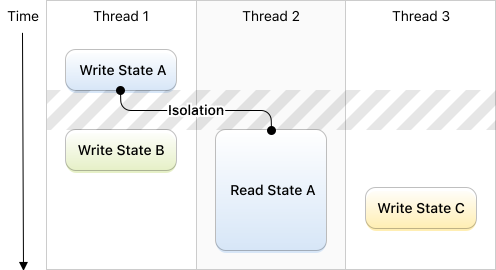
+Both ``DatabaseWriter/concurrentRead(_:)`` and ``DatabasePool/asyncConcurrentRead(_:)`` block until they can guarantee their closure argument an isolated access to the database, in the exact state left by the last transaction. It then asynchronously executes this closure.
+
+In the illustration below, the striped band shows the delay needed for the reading thread to acquire isolation. Until then, no other thread can write:
+
+
+
+Types that conform to ``TransactionObserver`` can also use those methods in their ``TransactionObserver/databaseDidCommit(_:)`` method, in order to process database changes without blocking other threads that want to write into the database.
+
+## Database Snapshots
+
+**``DatabasePool`` can take snapshots.** A database snapshot sees an unchanging database content, as it existed at the moment it was created.
+
+"Unchanging" means that a snapshot never sees any database modifications during all its lifetime. And yet it doesn't prevent database updates. This "magic" is made possible by SQLite's WAL mode (see [Isolation In SQLite](https://sqlite.org/isolation.html)).
+
+```swift
+let snapshot = try dbPool.makeSnapshot()
+```
+
+You can create as many snapshots as you need, regardless of the maximum number of readers defined by the ``Configuration/maximumReaderCount`` configuration. A snapshot connection is closed when the snapshot is deallocated.
+
+**A snapshot can be used from any thread.** It has the same database access methods as database queues and pools, defined by the ``DatabaseReader`` protocol:
+
+```swift
+let playerCount = try snapshot.read { db in
+ try Player.fetchCount(db)
+}
+```
+
+When you want to control the latest committed changes seen by a snapshot, create the snapshot from within a write, outside of any transaction:
+
+```swift
+let snapshot1 = try dbPool.writeWithoutTransaction { db -> DatabaseSnapshot in
+ try db.inTransaction {
+ // delete all players
+ try Player.deleteAll()
+ return .commit
+ }
+
+ // <- not in a transaction here
+ return dbPool.makeSnapshot()
+}
+// <- Other threads may modify the database here
+let snapshot2 = try dbPool.makeSnapshot()
+
+try snapshot1.read { db in
+ // Guaranteed to be zero
+ try Player.fetchCount(db)
+}
+
+try snapshot2.read { db in
+ // Could be anything
+ try Player.fetchCount(db)
+}
+```
+
+## Topics
+
+### Database Connections with Concurrency Guarantees
+
+- ``DatabaseReader``
+- ``DatabaseWriter``
+
+[demo apps]: https://github.com/groue/GRDB.swift/tree/master/Documentation/DemoApps
+[`SQLITE_BUSY`]: https://www.sqlite.org/rescode.html#busy
+[Sharing a Database]: SharingADatabase.md
+[RxGRDB]: https://github.com/RxSwiftCommunity/RxGRDB
+[demo applications]: https://github.com/groue/GRDB.swift/tree/master/Documentation/DemoApps
diff --git a/GRDB/Documentation.docc/DatabaseConnections.md b/GRDB/Documentation.docc/DatabaseConnections.md
index 54a5c2bc6..6e5f61819 100644
--- a/GRDB/Documentation.docc/DatabaseConnections.md
+++ b/GRDB/Documentation.docc/DatabaseConnections.md
@@ -33,8 +33,6 @@ The differences are:
- ``DatabaseQueue``
- ``DatabasePool``
- ``DatabaseSnapshot``
-- ``DatabaseReader``
-- ``DatabaseWriter``
### Using Database Connections
diff --git a/GRDB/Documentation.docc/DatabaseSharing.md b/GRDB/Documentation.docc/DatabaseSharing.md
new file mode 100644
index 000000000..49f63f1f2
--- /dev/null
+++ b/GRDB/Documentation.docc/DatabaseSharing.md
@@ -0,0 +1,251 @@
+# Sharing a Database
+
+How to share an SQLite Database between several processes.
+
+## Overview
+
+**This guide describes a recommended setup that applies as soon as several processes want to access the same SQLite database.** It complements the guide, that you should read first.
+
+On iOS for example, you can share database files between multiple processes by storing them in an [App Group Container](https://developer.apple.com/documentation/foundation/nsfilemanager/1412643-containerurlforsecurityapplicati). On macOS, several processes may want to open the same database, according to their particular sandboxing contexts.
+
+Accessing a shared database from several SQLite connections, from several processes, creates challenges at various levels:
+
+1. **Database setup** may be attempted by multiple processes, concurrently, with possible conflicts.
+2. **SQLite** may throw [`SQLITE_BUSY`] errors, "database is locked".
+3. **iOS** may kill your application with a [`0xDEAD10CC`] exception.
+4. **GRDB** does not detect changes performed by external processes.
+
+We'll address all of those challenges below.
+
+> Important: Preventing errors that may happen due to database sharing is difficult. It is extremely difficult on iOS. And it is almost impossible to test.
+>
+> Always consider sharing plain files, or any other inter-process communication technique, before sharing an SQLite database.
+
+## Use a Database Pool
+
+In order to access a shared database, use a ``DatabasePool``. It opens the database in the [WAL mode], which helps sharing a database.
+
+Since several processes may open the database at the same time, protect the creation of the database pool with an [NSFileCoordinator].
+
+- In a process that can create and write in the database, use this sample code:
+
+ ```swift
+ /// Returns an initialized database pool at the shared location databaseURL
+ func openSharedDatabase(at databaseURL: URL) throws -> DatabasePool {
+ let coordinator = NSFileCoordinator(filePresenter: nil)
+ var coordinatorError: NSError?
+ var dbPool: DatabasePool?
+ var dbError: Error?
+ coordinator.coordinate(writingItemAt: databaseURL, options: .forMerging, error: &coordinatorError) { url in
+ do {
+ dbPool = try openDatabase(at: url)
+ } catch {
+ dbError = error
+ }
+ }
+ if let error = dbError ?? coordinatorError {
+ throw error
+ }
+ return dbPool!
+ }
+
+ private func openDatabase(at databaseURL: URL) throws -> DatabasePool {
+ var configuration = Configuration()
+ configuration.prepareDatabase { db in
+ // Activate the persistent WAL mode so that
+ // read-only processes can access the database.
+ //
+ // See https://www.sqlite.org/walformat.html#operations_that_require_locks_and_which_locks_those_operations_use
+ // and https://www.sqlite.org/c3ref/c_fcntl_begin_atomic_write.html#sqlitefcntlpersistwal
+ if db.configuration.readonly == false {
+ var flag: CInt = 1
+ let code = withUnsafeMutablePointer(to: &flag) { flagP in
+ sqlite3_file_control(db.sqliteConnection, nil, SQLITE_FCNTL_PERSIST_WAL, flagP)
+ }
+ guard code == SQLITE_OK else {
+ throw DatabaseError(resultCode: ResultCode(rawValue: code))
+ }
+ }
+ }
+ let dbPool = try DatabasePool(path: databaseURL.path, configuration: configuration)
+
+ // Perform here other database setups, such as defining
+ // the database schema with a DatabaseMigrator, and
+ // checking if the application can open the file:
+ try migrator.migrate(dbPool)
+ if try dbPool.read(migrator.hasBeenSuperseded) {
+ // Database is too recent
+ throw /* some error */
+ }
+
+ return dbPool
+ }
+ ```
+
+- In a process that only reads in the database, use this sample code:
+
+ ```swift
+ /// Returns an initialized database pool at the shared location databaseURL,
+ /// or nil if the database is not created yet, or does not have the required
+ /// schema version.
+ func openSharedReadOnlyDatabase(at databaseURL: URL) throws -> DatabasePool? {
+ let coordinator = NSFileCoordinator(filePresenter: nil)
+ var coordinatorError: NSError?
+ var dbPool: DatabasePool?
+ var dbError: Error?
+ coordinator.coordinate(readingItemAt: databaseURL, options: .withoutChanges, error: &coordinatorError) { url in
+ do {
+ dbPool = try openReadOnlyDatabase(at: url)
+ } catch {
+ dbError = error
+ }
+ }
+ if let error = dbError ?? coordinatorError {
+ throw error
+ }
+ return dbPool
+ }
+
+ private func openReadOnlyDatabase(at databaseURL: URL) throws -> DatabasePool? {
+ do {
+ var configuration = Configuration()
+ configuration.readonly = true
+ let dbPool = try DatabasePool(path: databaseURL.path, configuration: configuration)
+
+ // Check here if the database schema is the expected one,
+ // for example with a DatabaseMigrator:
+ return try dbPool.read { db in
+ if try migrator.hasBeenSuperseded(db) {
+ // Database is too recent
+ return nil
+ } else if try migrator.hasCompletedMigrations(db) == false {
+ // Database is too old
+ return nil
+ }
+ return dbPool
+ }
+ } catch {
+ if FileManager.default.fileExists(atPath: databaseURL.path) {
+ throw error
+ } else {
+ return nil
+ }
+ }
+ }
+ ```
+
+
+#### The Specific Case of Read-Only Connections
+
+Read-only connections will fail unless two extra files ending in `-shm` and `-wal` are present next to the database file ([source](https://www.sqlite.org/walformat.html#operations_that_require_locks_and_which_locks_those_operations_use)). Those files are regular companions of databases in the [WAL mode]. But they are deleted, under regular operations, when database connections are closed. Precisely speaking, they *may* be deleted: it depends on the SQLite and the operating system versions ([source](https://github.com/groue/GRDB.swift/issues/739#issuecomment-604363998)). And when they are deleted, read-only connections fail.
+
+The solution is to enable the "persistent WAL mode", as shown in the sample code above, by setting the [SQLITE_FCNTL_PERSIST_WAL](https://www.sqlite.org/c3ref/c_fcntl_begin_atomic_write.html#sqlitefcntlpersistwal) flag. This mode makes sure the `-shm` and `-wal` files are never deleted, and guarantees a database access to read-only connections.
+
+
+## How to limit the SQLITE_BUSY error
+
+> SQLite Documentation: The [`SQLITE_BUSY`] result code indicates that the database file could not be written (or in some cases read) because of concurrent activity by some other database connection, usually a database connection in a separate process.
+
+If several processes want to write in the database, configure the database pool of each process that wants to write:
+
+```swift
+var configuration = Configuration()
+configuration.busyMode = .timeout(/* a TimeInterval */)
+let dbPool = try DatabasePool(path: ..., configuration: configuration)
+```
+
+With such a setup, you may still get `SQLITE_BUSY` errors from all write operations. They will occur if the database remains locked by another process for longer than the specified timeout. You can catch those errors:
+
+```swift
+do {
+ try dbPool.write { db in ... }
+} catch DatabaseError.SQLITE_BUSY {
+ // Another process won't let you write. Deal with it.
+}
+```
+
+## How to limit the 0xDEAD10CC exception
+
+> Apple documentation: [`0xDEAD10CC`] (pronounced “dead lock”): the operating system terminated the app because it held on to a file lock or SQLite database lock during suspension.
+
+#### If you use SQLCipher
+
+Use SQLCipher 4+, and configure the database from ``Configuration/prepareDatabase(_:)``:
+
+```swift
+var configuration = Configuration()
+configuration.prepareDatabase { (db: Database) in
+ try db.usePassphrase("secret")
+ try db.execute(sql: "PRAGMA cipher_plaintext_header_size = 32")
+}
+let dbPool = try DatabasePool(path: ..., configuration: configuration)
+```
+
+Applications become responsible for managing the salt themselves: see [instructions](https://www.zetetic.net/sqlcipher/sqlcipher-api/#cipher_plaintext_header_size). See also for more context and information.
+
+#### In all cases
+
+The technique described below is based on [this discussion](https://developer.apple.com/forums/thread/126438) on the Apple Developer Forums. It is [**🔥 EXPERIMENTAL**](https://github.com/groue/GRDB.swift/blob/master/README.md#what-are-experimental-features).
+
+In each process that writes in the database, set the ``Configuration/observesSuspensionNotifications`` configuration flag:
+
+```swift
+var configuration = Configuration()
+configuration.observesSuspensionNotifications = true
+let dbPool = try DatabasePool(path: ..., configuration: configuration)
+```
+
+Post ``Database/suspendNotification`` when the application is about to be [suspended](https://developer.apple.com/documentation/uikit/app_and_environment/managing_your_app_s_life_cycle). You can for example post this notification from `UIApplicationDelegate.applicationDidEnterBackground(_:)`, or in the expiration handler of a [background task](https://forums.developer.apple.com/thread/85066):
+
+```swift
+class AppDelegate: UIResponder, UIApplicationDelegate {
+ func applicationDidEnterBackground(_ application: UIApplication) {
+ NotificationCenter.default.post(name: Database.suspendNotification, object: self)
+ }
+}
+```
+
+Once suspended, a database won't acquire any new lock that could cause the `0xDEAD10CC` exception.
+
+In exchange, you will get `SQLITE_INTERRUPT` (code 9) or `SQLITE_ABORT` (code 4) errors, with messages "Database is suspended", "Transaction was aborted", or "interrupted". You can catch those errors:
+
+```swift
+do {
+ try dbPool.write { db in ... }
+} catch DatabaseError.SQLITE_INTERRUPT, DatabaseError.SQLITE_ABORT {
+ // Oops, the database is suspended.
+ // Maybe try again after database is resumed?
+}
+```
+
+Post ``Database/resumeNotification`` in order to resume suspended databases. You can safely post this notification when the app comes back to foreground.
+
+In applications that use the background modes supported by iOS, post `resumeNotification` method from each and every background mode callback that may use the database, and don't forget to post `suspendNotification` again before the app turns suspended.
+
+## How to perform cross-process database observation
+
+ features are not able to detect database changes performed by other processes.
+
+Whenever you need to notify other processes that the database has been changed, you will have to use a cross-process notification mechanism such as [NSFileCoordinator] or [CFNotificationCenterGetDarwinNotifyCenter].
+
+You can trigger those notifications automatically with ``DatabaseRegionObservation``:
+
+```swift
+// Notify all changes made to the database
+let observation = DatabaseRegionObservation(tracking: .fullDatabase)
+let observer = try observation.start(in: dbPool) { db in
+ // Notify other processes
+}
+
+// Notify changes made to the "player" and "team" tables only
+let observation = DatabaseRegionObservation(tracking: Player.all(), Team.all())
+let observer = try observation.start(in: dbPool) { db in
+ // Notify other processes
+}
+```
+
+[NSFileCoordinator]: https://developer.apple.com/documentation/foundation/nsfilecoordinator
+[CFNotificationCenterGetDarwinNotifyCenter]: https://developer.apple.com/documentation/corefoundation/1542572-cfnotificationcentergetdarwinnot
+[WAL mode]: https://www.sqlite.org/wal.html
+[`SQLITE_BUSY`]: https://www.sqlite.org/rescode.html#busy
+[`0xDEAD10CC`]: https://developer.apple.com/documentation/xcode/understanding-the-exception-types-in-a-crash-report
diff --git a/GRDB/Documentation.docc/Documentation.md b/GRDB/Documentation.docc/Documentation.md
index 2303485fa..548b739df 100644
--- a/GRDB/Documentation.docc/Documentation.md
+++ b/GRDB/Documentation.docc/Documentation.md
@@ -13,6 +13,7 @@ GRDB provides raw access to SQL and advanced SQLite features, because one someti
-
-
+-
### Migrations and The Database Schema
@@ -32,6 +33,10 @@ GRDB provides raw access to SQL and advanced SQLite features, because one someti
- ``FTS3``
- ``FTS4``
+### Database Techniques
+
+-
+
### Combine Publishers
- ``DatabasePublishers``
diff --git a/README.md b/README.md
index ce0d60cee..8d903a113 100644
--- a/README.md
+++ b/README.md
@@ -79,7 +79,7 @@ Programming tools for both database beginners and SQLite experts:
In-depth integration with our programming environment:
-- [Swift Concurrency]: `try await` your database.
+- [Swift Concurrency](https://groue.github.io/GRDB.swift/docs/6.3/documentation/grdb/concurrency): `try await` your database.
- [SwiftUI](http://github.com/groue/GRDBQuery): Access and observe the database from your SwiftUI views.
- [Combine](Documentation/Combine.md): Access and observe the database with Combine publishers.
- [RxSwift](http://github.com/RxSwiftCommunity/RxGRDB): Access and observe the database with RxSwift observables.
@@ -567,7 +567,7 @@ See the [Concurrency] guide for asynchronous database accesses.
When precise transaction handling is required, see [Transactions and Savepoints](#transactions-and-savepoints).
-- Database pools can take [snapshots](Documentation/Concurrency.md#database-snapshots) of the database.
+- Database pools can take [snapshots](https://groue.github.io/GRDB.swift/docs/6.3/documentation/grdb/databasesnapshot) of the database.
**A database pool needs your application to follow rules in order to deliver its safety guarantees.** See the [Concurrency] guide for more details about database pools, how they differ from database queues, and advanced use cases.
@@ -1677,7 +1677,7 @@ In order to customize the JSON format, provide a custom implementation of the `D
**A transaction** is a fundamental tool of SQLite that guarantees [data consistency](https://www.sqlite.org/transactional.html) as well as [proper isolation](https://sqlite.org/isolation.html) between application threads and database connections.
-GRDB generally opens transactions for you, as a way to enforce its [concurrency guarantees](Documentation/Concurrency.md#safe-and-unsafe-database-accesses), and provide maximal security for both your application data and application logic:
+GRDB generally opens transactions for you, as a way to enforce its [concurrency guarantees](https://groue.github.io/GRDB.swift/docs/6.3/documentation/grdb/concurrency), and provide maximal security for both your application data and application logic:
```swift
// BEGIN TRANSACTION
@@ -7433,7 +7433,7 @@ try dbPool.barrierWriteWithoutTransaction { db in
> }
> ```
-> **Note**: The `DatabasePool.barrierWriteWithoutTransaction` method does not prevent [database snapshots](Documentation/Concurrency.md#database-snapshots) from accessing the database during the passphrase change, or after the new passphrase has been applied to the database. Those database accesses may throw errors. Applications should provide their own mechanism for invalidating open snapshots before the passphrase is changed.
+> **Note**: The `DatabasePool.barrierWriteWithoutTransaction` method does not prevent [database snapshots](https://groue.github.io/GRDB.swift/docs/6.3/documentation/grdb/databasesnapshot) from accessing the database during the passphrase change, or after the new passphrase has been applied to the database. Those database accesses may throw errors. Applications should provide their own mechanism for invalidating open snapshots before the passphrase is changed.
> **Note**: Instead of changing the passphrase "in place" as described here, you can also export the database in a new encrypted database that uses the new passphrase. See [Exporting a Database to an Encrypted Database](#exporting-a-database-to-an-encrypted-database).
@@ -8745,23 +8745,23 @@ This chapter has been superseded by [ValueObservation] and [DatabaseRegionObserv
#### Concurrency
-This chapter has [moved](Documentation/Concurrency.md).
+This chapter has [moved](https://groue.github.io/GRDB.swift/docs/6.3/documentation/grdb/concurrency).
#### Guarantees and Rules
-This chapter is now split into [Concurrency Rules](Documentation/Concurrency.md#concurrency-rules) and [Safe and Unsafe Database Accesses](Documentation/Concurrency.md#safe-and-unsafe-database-accesses).
+This chapter has [moved](https://groue.github.io/GRDB.swift/docs/6.3/documentation/grdb/concurrency).
#### Differences between Database Queues and Pools
-This chapter has [moved](Documentation/Concurrency.md#differences-between-database-queues-and-pools).
+This chapter has [moved](https://groue.github.io/GRDB.swift/docs/6.3/documentation/grdb/concurrency).
#### Advanced DatabasePool
-This chapter has [moved](Documentation/Concurrency.md#advanced-databasepool).
+This chapter has [moved](https://groue.github.io/GRDB.swift/docs/6.3/documentation/grdb/concurrency).
#### Database Snapshots
-This chapter has [moved](Documentation/Concurrency.md#database-snapshots).
+This chapter has [moved](https://groue.github.io/GRDB.swift/docs/6.3/documentation/grdb/concurrency).
#### DatabaseWriter and DatabaseReader Protocols
@@ -8769,11 +8769,11 @@ This chapter was removed. See the references of [DatabaseReader](https://groue.g
#### Asynchronous APIs
-This chapter has [moved](Documentation/Concurrency.md#synchronous-and-asynchronous-database-accesses).
+This chapter has [moved](https://groue.github.io/GRDB.swift/docs/6.3/documentation/grdb/concurrency).
#### Unsafe Concurrency APIs
-This chapter has [moved](Documentation/Concurrency.md#safe-and-unsafe-database-accesses).
+This chapter has [moved](https://groue.github.io/GRDB.swift/docs/6.3/documentation/grdb/concurrency).
### Adding support for missing SQL functions or operators
@@ -8813,8 +8813,7 @@ This chapter was renamed to [Embedding SQL in Query Interface Requests].
[custom SQLite build]: Documentation/CustomSQLiteBuilds.md
[Combine]: https://developer.apple.com/documentation/combine
[Combine Support]: Documentation/Combine.md
-[Swift Concurrency]: Documentation/Concurrency.md
-[Concurrency]: Documentation/Concurrency.md
+[Concurrency]: https://groue.github.io/GRDB.swift/docs/6.3/documentation/grdb/concurrency
[Demo Applications]: Documentation/DemoApps
[Sharing a Database]: Documentation/SharingADatabase.md
[FAQ]: #faq
diff --git a/Tests/GRDBTests/DatabasePoolConcurrencyTests.swift b/Tests/GRDBTests/DatabasePoolConcurrencyTests.swift
index 33327ba72..feb1700f9 100644
--- a/Tests/GRDBTests/DatabasePoolConcurrencyTests.swift
+++ b/Tests/GRDBTests/DatabasePoolConcurrencyTests.swift
@@ -1335,13 +1335,13 @@ class DatabasePoolConcurrencyTests: GRDBTestCase {
let coordinator = NSFileCoordinator(filePresenter: nil)
var coordinatorError: NSError?
var poolError: Error?
- coordinator.coordinate(writingItemAt: dbURL, options: .forMerging, error: &coordinatorError, byAccessor: { url in
+ coordinator.coordinate(writingItemAt: dbURL, options: .forMerging, error: &coordinatorError) { url in
do {
_ = try DatabasePool(path: url.path)
} catch {
poolError = error
}
- })
+ }
XCTAssert(poolError ?? coordinatorError == nil)
}
}
@@ -1349,27 +1349,27 @@ class DatabasePoolConcurrencyTests: GRDBTestCase {
// MARK: - NSFileCoordinator sample code tests
- // Test for sample code in Documentation/SharingADatabase.md.
+ // Test for sample code in Documentation.docc/DatabaseSharing.md.
// This test passes if this method compiles
private func openSharedDatabase(at databaseURL: URL) throws -> DatabasePool {
let coordinator = NSFileCoordinator(filePresenter: nil)
var coordinatorError: NSError?
var dbPool: DatabasePool?
var dbError: Error?
- coordinator.coordinate(writingItemAt: databaseURL, options: .forMerging, error: &coordinatorError, byAccessor: { url in
+ coordinator.coordinate(writingItemAt: databaseURL, options: .forMerging, error: &coordinatorError) { url in
do {
dbPool = try openDatabase(at: url)
} catch {
dbError = error
}
- })
+ }
if let error = dbError ?? coordinatorError {
throw error
}
return dbPool!
}
- // Test for sample code in Documentation/SharingADatabase.md.
+ // Test for sample code in Documentation.docc/DatabaseSharing.md.
// This test passes if this method compiles
private func openDatabase(at databaseURL: URL) throws -> DatabasePool {
let dbPool = try DatabasePool(path: databaseURL.path)
@@ -1378,27 +1378,27 @@ class DatabasePoolConcurrencyTests: GRDBTestCase {
return dbPool
}
- // Test for sample code in Documentation/SharingADatabase.md.
+ // Test for sample code in Documentation.docc/DatabaseSharing.md.
// This test passes if this method compiles
private func openSharedReadOnlyDatabase(at databaseURL: URL) throws -> DatabasePool? {
let coordinator = NSFileCoordinator(filePresenter: nil)
var coordinatorError: NSError?
var dbPool: DatabasePool?
var dbError: Error?
- coordinator.coordinate(readingItemAt: databaseURL, options: .withoutChanges, error: &coordinatorError, byAccessor: { url in
+ coordinator.coordinate(readingItemAt: databaseURL, options: .withoutChanges, error: &coordinatorError) { url in
do {
dbPool = try openReadOnlyDatabase(at: url)
} catch {
dbError = error
}
- })
+ }
if let error = dbError ?? coordinatorError {
throw error
}
return dbPool
}
- // Test for sample code in Documentation/SharingADatabase.md.
+ // Test for sample code in Documentation.docc/DatabaseSharing.md.
// This test passes if this method compiles
private func openReadOnlyDatabase(at databaseURL: URL) throws -> DatabasePool? {
do {